43LJ523T.ATA

Help Library

Topic

  • Document Contents
    Troubleshooting
    How To Find My LG Model and Serial Number
    At a Glance-----------LG makes it easy to find your product's serial number and model number. Forassistance in locating your product's information choose your LG product fromthe categories below.Select Your ProductThis guide was created for...
  • Document Contents
    Troubleshooting
    [LG TV] I want to know how to install and connect a digital antenna (UHD) and watch the TV
    Try this--------Do you have a UHD antenna?➔ Connect the UHD antenna to the UHD TV port on the back of the TV.Check available regions for UHD reception.How to connect an antennaInstall an antenna in a location where it can receive a UHD sign...
  • Document Contents
    Troubleshooting
    [LG TV] How to Fix Internet Connection Issues
    If your LG TV is not connecting to the internet, first check if other devices,such as a smartphone or laptop, can connect to the same network.If no devices can connect, the issue is likely with your router or internetservice provider (ISP)....
  • Document Contents
    Troubleshooting
    [LG TV Sound] When I connect a PC to my TV via HDMI, there is video but no sound
    When I connect a PC to my TV via HDMI, there is video but no soundIf a laptop or PC is connected to the TV through the HDMI port but the computersound settings are configured incorrectly, the video works okay but withoutaudio.Causes and Sym...
  • Document Contents
    Troubleshooting
    [LG TV] How to Agree to the User Agreements
    To access various content and services on your TV, connect to the internet andagree to the User Agreements.If the agreement process fails, first check your TV's internet connection andensure the Country/Region setting is correct.Service may...
  • Document Contents
    Troubleshooting
    [LG TV Time Machine] How can I use the Time Machine Recording feature?
    ➔ Please check the following before using Time Machine Recording. * Time Machine Recording is only available with digital channels being streamed via the antenna input. * If your TV is connected to multiple USB storage devices, the one used...
See more

Game App

You can enjoy more games by downloading them to an external device(USB memory, HDD). Use the links below to download.
NOTICE : Please prepare a USB memory or HDD to save Game App. files.

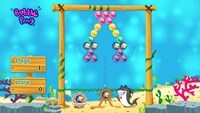
  • Bobble Pong

    Match three or more consecutive bubbles of the same color using the arrow.
    The matching bubbles will pop and your scores will rise.

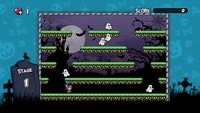
  • Monster World

    Get various items while avoiding monsters and pumpkins.
    Once you remove all monsters you can proceed to the next stage for more items!

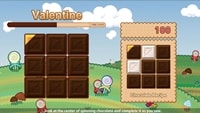
  • Valentine

    Match chocolate pieces by following each recipe to make it complete.