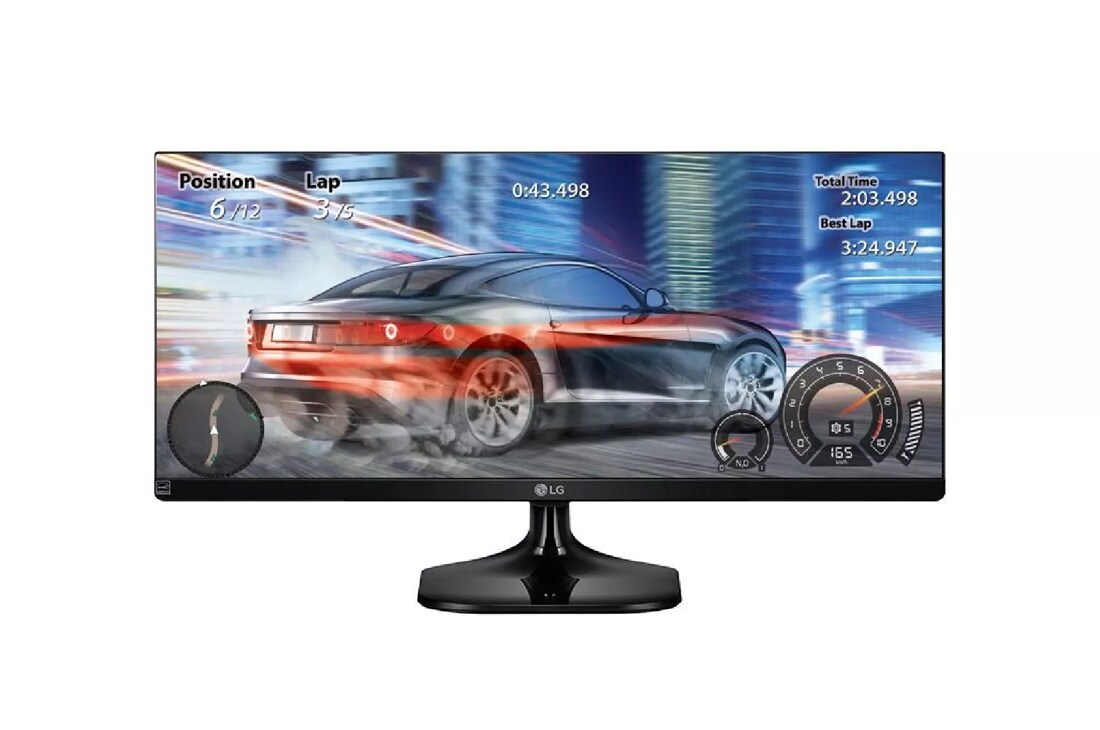
21:9 UltraWide®
Full HD IPS Display
The UltraWide 21:9 aspect ratio makes games and movies more immersive than ever. The clarity of 1080p pixel Full HD resolution with IPS is a game-changer. Simply put, from any viewing angle, everything looks more crisp and detailed in Full HD.
sRGB Over 99%
sRGB is the standard color space of ideal color reproduction. So, with over 99% coverage of the sRGB spectrum, this LG monitor is a great solution for professional photographers, graphic designers or anyone looking for highly accurate color.*
On-Screen Control
On-Screen Control puts a host of essential monitor settings into a handy window for quick, easy access. Volume, brightness, picture mode presets, Screen Split 2.0 and more can now be adjusted with just a few clicks of the mouse, instead of hard buttons on the monitor.
Learn More
openSoftware download required to enable OnScreen Control. For download details, visit LGUSA.com/OnScreenControlSupport
Screen Split 2.0
Customize your monitor layout for multitasking with the latest version of LG Screen Split. Resize and display multiple windows at once, with 14 options including four different picture-in-picture (PIP) choices.
Game Mode
Set your game mode optimal gaming conditions. There are 3 gamer modes, 2 First-Person-Shooter modes and even and RTS pre-set mode so you can choose the best mode for you.
Advanced Gaming Features
Serious gaming features for serious gamers. Quickly optimize monitor settings to activate Black Stabilizer to reveal superior detail in dark scenes while the Dynamic Action Sync feature assures smooth, fluid gaming action.
| Screen Size Class (diagonal) | 29" Class (29" diagonal) |
|---|---|
| Panel Type | IPS |
| Color Gamut (CIE1931) | sRGB over 99% |
| Color Depth (Number of Colors) | 8bits (6bit+FRC), 16.7M |
| Pixel Pitch (mm) | 0.2628 mm x 0.2628 mm |
| Response Time (GTG) | 5ms |
| Refresh Rate | 75Hz |
| Aspect Ratio | 21:9 |
| Resolution | 2560 x 1080 |
| Brightness (cd/m2) | 250 cd/m2 |
| Contrast Ratio | Mega |
| Viewing Angle | 178 / 178 |
| HDMI 2.0 | Yes (ver1.4, 2ea) |
|---|
| Type | Adapter |
|---|---|
| Input | 100~240V |
| Picture Mode | Yes |
|---|---|
| Ratio | Wide, Original, Cinema 1, Cinema 2, 1:1 |
| PIP | In Screen Split |
| DDC/CI | Yes |
| HDCP | Yes |
| Key Lock | Yes |
| Response Time Control | Yes |
| Game Mode | Yes |
| DAS Mode | Yes |
| Black Stabilizer | Yes |
| Flicker Safe | Yes |
| Smart Energy Saving | Yes |
| Automatic standby | Yes |
| Reader Mode | Yes (included in Picture Mode) |
| Six Axis Control | Yes |
| Screen Split 2.0 (in OSC) | Yes |
|---|---|
| My Display Preset (in OSC) | Yes |
| On-Screen Control (OSC) | Yes |
| Tilt (Angle) | -5~20 Degree |
|---|
| Without Stand (WxHxD) | 27.7" x 12.9" x 2.5" |
|---|---|
| With Stand (WxHxD) | 27.7" x 16.3" x 8.4" |
| Shipping Dimensions (WxHxD) | 30.8" x 17" x 5.7" |
| With Stand Weight | 11.5 lbs |
| Shipping Weight | 16.5 lbs |
| VESA® Size (mm) | 75 x 75 |
|---|---|
| Power Cord | Yes |
| HDMI | Yes |
| TCO | Yes (6.0) |
|---|---|
| UL(cUL) | Yes |
| TUV-type | Yes |
| FCC-B, CE | Yes |
| CCC (for China) | Yes |
| ErP | Yes |
| Windows | Yes |
| Limited Warranty | 1 Year Parts & Labor |
|---|---|
| UPC | 719192199170 |
What People Are Saying
We're here to support you with our product.
View 29UM58-P Product Support-
Warranty Information
View manufacturer warranty information
-
Register Your Product
Get the most out of your ownership
-
Manuals and Downloads
Download owner's manuals and documentation
-
Help Library
Help yourself to helpful product information
-
Video Tutorials
Learn how to install & operate your LG product
-
Request a Repair
Submit an online service request
-
Other Support Options
More help with your LG product
Contact us for any support inquiries.
-
Live Chat
Chat with an LG Support Representative.
Weekdays 8am-8pm CST -
Telephone
Call an LG Support Representative.
(800) 243-0000 Consumer (6am-midnight CST)
-
-
Email
No time to chat? Send LG Support your inquiry.
ASK & ANSWER
Ask your questions. Share your answers.
Please first review the detailed product information and help guides in the Product Support section for this product prior to posting a question.