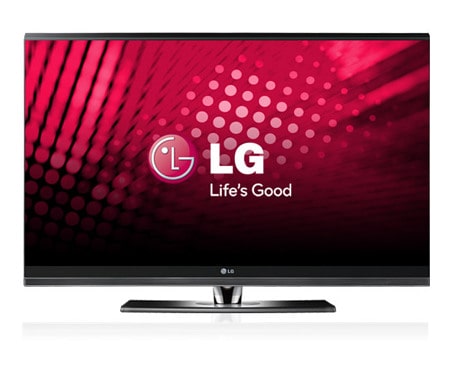
47" BORDERLESS™ Design Full HD LCD TV with Bluetooth
What is BORDERLESS™? At LG, we believe it is the limitless freedom to see things in a whole new way - the same design philosophy we adopted in creating the BORDERLESS™ range of premium televisions. Where we took a single sheet of glass and crafted it into something more, a television that represents the new standard in its class. One certain to become a design icon that will be talked about for years to come. With borderless freedom comes endless connectivity. Sync your entertainment with Bluetooth, DivX, USB, and more. The result? A BORDERLESS™ television that stands out among its kind, to become the defining centerpiece of your living room. Just as it was designed to do.
Please read the following important viewing and safety information before using the 3D imaging function on your TV.
CAUTION - WHEN VIEWING 3D IMAGING
Viewing Guide
When a TV can display in 3D when the TV is connected to a compatible device, such as a Blu-ray 3D Player. You need such a device to watch the TV in 3D. The 3D TV displays two separate pictures, each formatted for each eye. The viewer needs to wear 3D glasses in order to see each of these images in 3D format.
- To watch the TV in 3D, you must put on your 3D glasses. For best results, you should wear LG Brand 3D glasses. The 3D imaging may not display properly when using another brand of 3D glasses. Please see the 3D glasses manual for instructions on how to use the 3D glasses.
- After powering on the TV, a few seconds may be needed for your TV to calibrate.
- It may take a moment for you to see the 3D imaging if you look away from the TV and then revert your eyes back to the 3D program.
- The TV may flicker slightly if the 3D imaging is displayed under 3 wavelength lamp fluorescent light (50 Hz~60 Hz) or around windows displaying natural light. In such instances, it is recommended to turn the lights low and/or block the sun light with a curtain.
- If there is an obstacle between the television and the 3D glasses, the 3D imaging may not display properly.
- Do not use the TV in close proximity to other electronic equipments and IR equipments.
Safety Guide
- When viewing 3D imaging, watch the TV from an effective viewing angle and within the appropriate distance. The appropriate angle is 120°(when the viewing distance is 2m (6.5 ft)) and distance is 2m – 7m (6.5ft – 22.9ft). If you exceed this viewing angle or distance, you may not be able to view the 3D imaging. Furthermore, the 3D imaging may not display if it is viewed while you are lying down.
- If you watch the 3D imaging too closely or for a long period of time, it may harm your eyesight.
- Watching the TV or playing video games that incorporate 3D imaging with the 3D glasses for a long period of time can cause drowsiness, headaches or fatigue to you and/or your eyes. If you have a headache, or otherwise feel fatigued or drowsy, stop watching the TV and take a rest.
- Pregnant woman, seniors, persons with heart problems or persons who experience frequent drowsiness should refrain from watching 3D TV.
- Some 3D imaging may cause you to duck or dodge the image displayed in the video. Therefore, it is best if you do not watch 3D TV near fragile objects or near any objects that can be knocked over easily.
- Please prevent children under the age of 5 from watching 3D TV. It may affect their vision development.
Warning for photosensitization seizure:
- Some viewers may experience a seizure or epilepsy when exposed to certain factors, including flashing lights or images in TV or video games. If you or anybody from your family has a history of epilepsy or seizure, please consult with your doctor before watching 3D TV. Also certain symptoms can occur in unspecified conditions without any previous history. If you experience any of the following symptoms, immediately stop watching the 3D imaging and consult a doctor: dizziness or lightheadedness, visual transition or altered vision, visual or facial instability, such as eye or muscle twitching, unconscious action, convulsion, loss of conscience, confusion or disorientation, loss of directional sense, cramps, or nausea. Parents should monitor their children, including teenagers, for these symptoms as they may be more sensitive to the effects of watching 3D TV.
Risk of photosensitization seizure can be reduced with the following actions.
- Take frequent breaks from watching 3D TV.
- For those who have vision that is different in each eye, they should watch the TV after taking vision correction measures.
- Watch the TV so that your eyes are on the same level as the 3D screen and refrain from sitting too closely to the TV.
- Do not watch the 3D imaging when tired or sick, and avoid watching the 3D imaging for a long period of time.
- Do not wear the 3D glasses for any other purpose than viewing 3D imaging on a 3D TV.
- Some viewers may feel disoriented after watching 3D TV. Therefore, after you watch 3D TV, take a moment to regain awareness of your situation before moving.
Key Features
TruMotion 200Hz
Full HD 1080p Resolution
Bluetooth
HDMI 1.3 Inputs with Deep Colour Support
24p Real Cinema
AV Mode
Expert Mode
Invisible Speaker
Swivel Stand
TruMotion 200Hz
LG TruMotion 200hz is different from other 200hz technologies. Others use an interpolation system which creates "new frames" between each true frame. These interpolated frames are the TV’s best guess as to what should appear. LG TruMotion 200hz uses a different approach with frame insertion plus scanning backlight technology. By flashing on and off, the backlight produces actual black frames between true frames and inserted frames and therefore reduces motion blur, increasing sharpness and improving contrast level in dark scenes.
Full HD 1080p Resolution
Able to display 1080p pictures, like those found on Blu-ray disc. 1080p means 1,080 horizontal lines are used to create your TV picture.
24p Real Cinema
Unlike TV broadcasts, blockbuster movies are filmed at 24 frames per second. Blu-ray and HD-DVD movies also preserve this original 24fps. With conventional TV’s one frame is displayed 3 times, the next twice and then three times again, this can sometimes have an adverse judder effect on the movie With LG Real Cinema every frame is consistently processed 5 times in 1/24 of a second producing 120 fps (or 120Hz), thus totally eliminating the judder effect. Now you can enjoy the same picture quality as the director originally intended.
AV Mode
LG TVs have 3 special preset AV Modes which provide the best suitable image quality and sound for specific types of content. They are easily accessible using the AV MODE hot key on the remote control.
Invisible Speaker
Wide Sweet Spot. The front bezel works as a speaker, replacing the normal speaker grill. With the Invisible Speaker system, the speakers are embedded in strategic spots underneath and around the front bezel. They enhance the audio by increasing the ‘sweet spot’ to give a wider and richer sound field. This new speaker system provides a clean and fashionable design compared with traditional side or bottom speaker designs.
Expert Mode
LG TVs have a brand new Expert Mode feature, which allows advanced users to optimise the image to a level not previously possible. You can make up to 25 more fine adjustments than TVs typically allow The Expert Mode menu has been fully approved by the Image Science Foundation (ISF), an international organisation specialising in image quality calibration, There are also two preset options of ISF-DAY and ISF-NIGHT which have already been tuned specially by ISF.
Key Features
TruMotion 200Hz
Full HD 1080p Resolution
Bluetooth
HDMI 1.3 Inputs with Deep Colour Support
24p Real Cinema
AV Mode
Expert Mode
Invisible Speaker
Swivel Stand
Expand all SpecsClose all Specs
Video
Screen Size
47"
TruMotion
200Hz
HD Tuner(Built-In)
Yes (MPEG 2/4)
Resolution(px)
1920x1080p
Brightness
500cd/m²
Contrast Ratio
150,000:1
Wide Colour Control
Yes
Viewing Angle
178°/178°
Aspect Ratio
16:9
Audio
Audio Output
10W(2)
Speaker System
2 Way,4 Speakers
Dolby Digital Decoder
Yes
Special Features
Full HD
Yes
Single Layer
Yes
Expert Mode
Yes
XD Engine
Yes
Invisible Speaker
Yes
Swivel Stand
Yes
Bluetooth
Yes (Stereo/Mono Headset, MP3, JPEG)
Picture Wizard
Yes
24p Real Cinema
Yes
Simplink
Yes
AV Mode
Yes
Side Connections
AV In
Yes (1)
HDMI
Yes (1)
USB
Yes (1)
Rear Connections
RF In
Yes (1)
AV In
Yes (1)
Component In
Yes (2)
HDMI
Yes (3, v1.3)
RGB In
1
PC Audio In
Yes (1)
RS-232C
1
Dimensions
Without Stand(WxHxD)
1109.6x685.3x45.5mm
With Stand(WxHxD)
1109.6x751.7x320.2mm
General
Weight without Stand
23.6kg
Warranty
3 Years (Parts & Labour)
Energy Rating*
3.5 (*Star Rating is achieved when TV is used in Home Mode).
Disclaimer: All Product Specifications correct at the time of publishing. Specifications may change without prior notice. Customers are advised to check with your retailer before purchase. Actual product may differ slightly to that depicted for ongoing product development.
Recently Viewed
Recommended Products
47LH90QD47" LED backlit LCD TV with 200Hz TruMot.....
50PS80ED50" Full HD Frameless Plasma TV with inb.....
55LH50YD55" 200Hz Full HD LCD TV with Built in H.....
55LH80YD55" Wireless HD TV with Full HD 1080p re.....