
To properly experience our LG.com website, you will need to use an alternate browser or upgrade to a newer version of internet Explorer (IE10 or greater).
The LG.com website utilizes responsive design to provide convenient experience that conforms to your devices screen size. In order to get the best possible experience our LG.COM website please follow below instructions. If you’re using Internet Explorer 9 or earlier, you will need to use an alternate browser such as Firefox or Chrome or upgrade to a newer version of internet Explorer (IE10 or greater).


ADD TO WISHLIST
Add items to your MYLG wishlist
View Wishlist
Discontinued
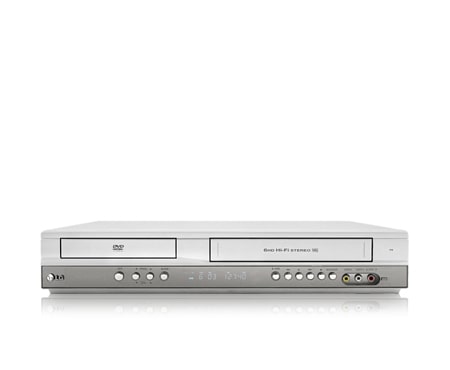
DVD Player with 6 Head Hi-Fi VCR

/

*titleText*
component-copyModel-toastMsg

See Retailer for Pricing
Limited Quantity Sale
Available QTY
*quantity* ea
-
Product Price(V271)
$*rPrice*$*rPromoPrice**discountPDPMsg*LG Members Price(V271)$*rMemberPrice*$*rMembershipPrice**discountPDPMsg*VIP Price(V271)$*rPrice*$*rVipPrice**discountPDPMsg*LG Members PriceApplicable only to products eligible for membership discounts.
Check your final priceOBS_CHEAPERPRICE_MSG$*cheaperPrice* -
Added products Price
Total price
MSRP$*improveTotalPrice*
Save $*discountPrice*
MSRP
$
See Retailer for Pricing
OBS_MEMBERSHIP_MSG $*recommendedMembershipPrice*
┗ *modelName*
$*discountedPrice*
*userFriendlyName*
Not available
$*discountedPrice*
Save $*discountPrice*
component-protectYour
0 component-selectedItems
*modelName*
$*rPrice*.*rPriceCent*
$*rPromoPrice*.*rPromoPriceCent*
*discountMsg*
OBS_LOWEST_PRICE_MARK_MSG
*retailerPricingText*
*modelName*
$*rPrice*.*rPriceCent*
$*rPromoPrice*.*rPromoPriceCent*
*discountMsg*
OBS_LOWEST_PRICE_MARK_MSG
*retailerPricingText*
DVD Player with 6 Head Hi-Fi VCR

DISC FORMAT
-
- DVD±R/DVD±RW Play
- Yes
- CD/CD-R/CD-RW Play
- Yes
-
- VHS Tape
- Yes
SYSTEM
-
- Progressive Scan
- Yes
- JPEG,WMA,& MP3
- Yes
CONNECTIONS(FRONT PANEL)
-
- AV Input
- Yes
- DVD/VCR
- Yes
CONNECTIONS(REAR PANEL)
-
- Analogue Audio Out
- Yes
- Analogue Audio In
- Yes
-
- Digital Audio Out Coaxial
- Yes
What people are saying
QUESTIONS? LET US HELP
View V271 Product Support
-
Warranty Information View manufacturer warranty information Learn more
-
Register a Product Find out latest product information and useful tips by registering your product Learn more
-
Manuals View and download information for your LG product Learn more
-
Software & Firmware Update your LG product with the latest version of software or firmware Learn more
-
LG Authorised Service Centre Find a service centre in your area Learn more
-
Request a Repair Does your LG product require a repair service? Learn more
-
Document Attachment Upload additional documents for obtaining service and support Learn more


Simply choose a support option from the icons below:
-
Live Chat Chat Online with LG Support.
Start Live Chat -
Telephone Call us on 1300 54 22 73
-
Email No time to chat?
Send your enquiry to us via email.
Send an Email


$*rPrice*.*rPriceCent*
$*rPromoPrice*.*rPromoPriceCent*
*discountMsg*
*retailerPricingText*
OBS_MEMBERSHIP_MSG $*siblingMembershipPrice*
*obsMemberShipLinkEnd*