LG

Optimus 7

  • OVERVIEW
  • FEATURES
  • SPECIFICATIONS
  • REVIEWS
  • SUPPORT
  • LG-bar-phones-Optimus-7-print.jsp
  • Back to All LG Phones
  • Optimus 7

    3.8" Touch Screen Phone with Windows Phone 7

    Compare (0)
    Recently Viewed (0)
    Recently Viewed

Be an instant expert

LG Optimus 7 All LG Phones

3.8" Touch Screen Phone with Windows Phone 7

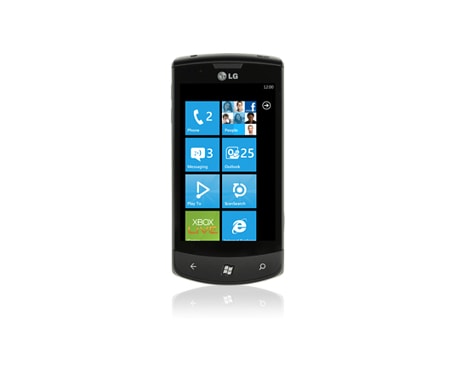
The LG Optimus 7 offers the glance and go experience of Windows Phone 7 combined with the added features available on LG devices.
These compelling applications (including DLNA-DMR based ‘Play To’, Augmented reality (AR) and Voice to Text) are available via live tiles on Windows Phone 7 or can be accessed from the LG store on the Marketplace

Optimus 7

What You Need to Know about All LG Phones


Explore Product Features

Optimus 7
8120

What You Need to Know about All LG Phones

The LG Design Philosophy for Mobile Phones

The LG Electronics Mobile Communications Company is a leading mobile communications and information company. With its cutting edge technology and innovative design capabilities, LG creates handsets that provide optimized mobile experience to customers around the world. LG is pursuing convergence technology and mobile computing products, while continuing its leadership role in mobile communication with stylish designs and smart technology.

How Many Mega Pixels Do I Really Need?

The choice of how many mega pixels you need on your phone depends on what you want to do with your photos. If you want to take high-resolution pictures, blow them up, and edit them on your computer, then pixel-size really matters. For more advanced camera functions, a 5 or 8 mega pixel camera works best. In short, the more pixels, the more versatility. LG camera phones have a range of pixel-sizes to suit your needs.

Mobile Phones FAQ

What Is Flight Mode and How Do I Switch It On and Off?

Also known as Airplane Mode, this setting eliminates just the wireless-radio parts of a mobile device, allowing for safe use of some features while in an airplane. On most LG phones it is possible to turn Flight Mode on or off via your phone’s settings.

How Do I Find Out What Software Version Is Installed on My Phone?

On most LG phones you can find out what software version is in use by looking at “handset information” under “Settings.”

How Do I Locate My Phone’s IMEI (International Mobile Equipment Identity)?

On most LG phones you can locate the IMEI by typing *#06# on the keypad, or by removing the battery cover and battery. (On most LG phones, the number is printed inside the battery cavity).

What Is My Phone’s Security Number?

The standard, pre-set security number on LG mobile phones is 0000.

Can I Change My Phone’s Font Size?

On most LG mobile phones, it is possible to change the font size under “Settings.”

What Is Specific Absorption Rate (SAR)?

SAR is the unit of measurement used in radio-wave exposure guidelines. Tests for SAR are conducted using standardised methods, with the phone transmitting at its highest certified power-level, in all employed frequency bands.

While SAR levels may vary between LG phones, they are all designed to meet the relevant guidelines for exposure to radio waves.

The SAR limit recommended by the International Commission on Non-Ionizing Radiation Protection (ICNIRP) is an average of 2 W/kg over 10 grams of tissue.

The SAR limit recommended in countries governed by the Institute of Electrical and Electronics Engineers (IEEE) is an average of 1.6 W/kg over 1 gram of tissue.

Are LG Mobile Phones Safe to Use? What about Radiation Levels?

Comprehensive research on Electro Magnetic Fields (EMFs) issues has been carried out over several decades. Based on these studies, it has not been shown that mobile phones that conform to international exposure standards cause any adverse health effects. All LG mobile phones conform to international exposure standards.

How Safe Are Mobile Phones?

At LG Electronics, the safety of our customers is of utmost importance.

At the same time, we understand that there has been speculation about the safety of mobile phones and the base stations they use. For example, some newspaper articles and news reports allege that illness may occur due to mobile phone use or living near a base station.

Nonetheless, for many years research has shown—and it is accepted scientific fact—that radio signals emitted from mobile phones and their base stations, within established safety levels, present no harmful effects to human health.

It is also important to note that government agencies, international health organizations, and other scientific bodies consistently review research findings. All LG mobile phones fulfill the relevant national and international safety standards, as well as the limits set by public health authorities.

Why Does Signal Strength Vary Between Different Phones?

The number of bars displayed on different phones may vary due to the algorithm used to convert incoming radio signals into displayed signal strength, a formula that varies from manufacturer to manufacturer. For this reason, two phones set side by side may display different levels of signal strength.

What Is a PIN code?

A PIN code is a security feature of SIM cards for GSM mobile phones.

How Do I Activate My Voice Mail, Call Forwarding, PIN code, and Call Waiting?

Voice mail, call forwarding, PIN code, and call waiting are network- and subscription-dependent features, not available in all areas. In order to activate these features, it is best to contact your service provider.

Can I Overcharge My Battery?

No, you cannot overcharge your phone’s battery. All LG mobile phones have a smart charge sensor that eliminates the danger of overcharging.

Why Am I Unable to Place International Calls?

Your service provider may automatically block international calling on your mobile phone. In order to remove this block, it is best to contact them directly. Another reason you may not be able to place outgoing international calls is if you have failed to enter the appropriate country code.

How Do I Use My Dual-Band Phone Abroad?

Using your dual-band phone abroad will depend on your network operator. In some cases, you may need a special SIM card. Or, you may need to request that your service provider activates “roaming” facilities on your phone (for which they may assess an additional fee). Contact your service provider for further information.

Can I Use My LG mobile Telephone in Other Countries?

To determine whether you can use you LG mobile phone in other countries, contact your service provider. Different countries operate under different cellular systems, and some countries may require you to register a phone prior to your visit. It is best to contact your service provider before traveling to make any necessary arrangements.

What Does "Service Not Available" Mean?

Typically, 'Service Not Available' is the error message shown when the data-link to your network is unavailable. You may be able to get through if you try again later.

Why Am I Having Trouble Viewing Certain Websites on My Mobile Phone?

Wireless Application Protocol (WAP) for web access is a relatively new technology and therefore some incompatibilities may exist between different web sites and mobile phones. There are thousands of WAP-compatible web sites, but your service provider may limit your access to certain sites. Contact your service provider for more information.

Is WAP Secure?

Yes, WAP security is provided by a WTLS (Wireless Transport Layer Security) specification, which implements authentication and encryption options.

What Kind of Services Can You Access Using WAP?

WAP provides access to traffic reports, weather forecasts, e-mail, sports, news, mapping, and service locators, among other features. E-commerce transactions and online banking will be available in the near future.

What Is a WAP browser?

A WAP browser allows you to connect to the Internet and interact with specially designed interactive services to view WAP pages using your mobile phone. This technology gives you access to information from the WAP part of the World Wide Web quicker than you would be able to access HTML pages via a traditional web browser.

What Is Recharge Time?

Recharge time is the amount of time it takes to recharge your mobile phone’s battery.

What Is Talk Time?

Talk time is the amount of time your battery will last when making and receiving calls.

What Is Standby Time?

Standby time is the amount of time your battery will last if the phone is powered on but you are not making calls.

How Do I Transfer Music from My Computer to My Mobile Phone?

LG has worked diligently to make transferring music from your computer to your phone extremely easy. While each phone has slight variations, the following instructions are standard:

After installing PC Suite, connect your mobile phone to your PC via USB cable
-Select “Synchronize My Music”
-Expand the “All My Music” playlist
-Click-and-drag albums to your phone

It’s that simple. And, with a microSD™ memory card, you can store additional music and take it with you, wherever you go.

Key Features

  • Outlook Integration
  • Intelligent Shot
  • ScanSearch
  • People Hub
  • Voice-to-Text**
  • Play To*
Outlook Integration
Enable Microsoft Outlook integration on the Optimus 7 to synchronize your Calendar, Mail and Contacts via your Windows Live ID.
Intelligent Shot
Shoot and share great quality moments with the 5.0 Megapixel digital camera, which includes Intelligent Shot mode. Share images with friends instantly by uploading them directly to your favourite Social Network site.
ScanSearch
An Augmented Reality application that connects users with a world of information, is another unique feature available on LG Optimus 7. Users can access real-time information about shopping, dining, weather, entertainment and banking, bringing together online and offline worlds.
People Hub
Unite your contacts with People Hub; bring together contacts, status updates and photos in one handy view, with Windows Live and Facebook updates in a single list.
Voice-to-Text**
LG’s Voice-to-Text feature allows communication without the need for finger input. Users have the freedom to transcribe their voice into text for updating Facebook and Twitter or composing emails and memos for convenient, hands-free communication. **services available via download from LG Store on Marketplace late 2010
Play To*
‘Play To’ lets users share multimedia files from the phone to other DLNA-DMR enabled devices via WiFi and without having to connect cables. Users can send videos and photos from their LG Optimus 7 to a DLNA-DMR enabled TV or enjoy music stored on their phone through their DLNA-DMR enabled sound system. *The ‘Play To’ function will only operate in conjunction with compatible DLNA-DMR enabled devices. Consumers are advised to check the compatibility of their DLNA-DMR device. The streaming function will only operate when both the phone and the DLNA-DMR enabled devices are connected to the same wireless network. Certain High Definition content may not be capable of being streamed without a high speed router supporting the Wi-Fi ‘n’ standard.

Key Features

  • Outlook Integration
  • Intelligent Shot
  • ScanSearch
  • People Hub
  • Voice-to-Text**
  • Play To*

Expand all SpecsClose all Specs

Operating Frequency

GSM
850/900/1800/1900
UMTS
900/1900/2100/GPRS Class 12/EDGE Class 12/HSDPA Speed DL:7.2/UL:5.7

Dimensions

Height
125mm
Width
59.8mm
Thickness
11.5mm
Weight
156g (With Battery)

Screen Display

Primary Size/Colours
3.8"/16M
Width(px)
480
Height(px)
800
Touch Screen
Yes (Capacitive Touch)
LCD/Other
TFT

Memory

Internal
16GB
RAM
512MB
CPU
1GHz Snapdragon

Messaging

SMS
Yes
MMS
Yes
Email
Yes

Camera

Mega Pixels
5
Flash/LED
LED
Auto Focus
Yes
Digital Zoom
4x
Other form factors
Panorama Shot

Music

Audio Formats
WMA v9/MP3/WAVE/AAC
Video Formats
WMV converted by Zune Desktop
FM Radio
Yes

Battery

Type
Lithium Ion 1500mAh
Stand-by Time
400 hours
Talk Time
6 hours
Audio Playback
22 hours (MP3 Ear-Mic)
Video Playback
4 hours

Connectivity

Bluetooth
2.1+EDR A2DP (headset only at launch)
USB
Yes
PC Sync
Yes
Web Up Load Speed
5.7mbps

Tools

Calendar/Organiser
Yes
Alarm
Yes
Phone Book Entries
No hard limit (Dependent on available memory)

Personalisation

Wallpaper
Yes (for locked screen only)
Picture Downloading
Yes

Advanced Features

Speaker Phone
Yes
WAP
Yes
Voice Recording
Yes
Document Viewer
Yes
Keytone Effect
Yes
WiFi
Yes
GPS
Yes

Others

720p HD Video Recording
Yes
ScanSearch Augmented Reality
Yes

In Box

Battery
Yes
User Manual
Yes
Quick Start Guide
Yes
A/C Charger
Yes
Data Cable
Yes
Handsfree
Yes

Carrier

Optus
Yes


Disclaimer: All Product Specifications correct at the time of publishing. Specifications may change without prior notice. Customers are advised to check with your retailer before purchase. Actual product may differ slightly to that depicted for ongoing product development.
Optimus 7 4.9 5 14 14
updated great purchase from my 15 year old nokia who had to be retired updated to the lg optimus 7 one word wow it has everything you need and more opened up the world love it great price very happy being trying everything on it hubby not happy i mess around with the alarm and forgot to turn it off 5 am sunday morning still laughing best purchase for a long time 24 March 2012
LG pleases again! Just added 2 of these phones to our ever increasing collection of great LG products. So far I am very impressed with it and also the Windows 7.5 operating system it uses. It is virtually lag free on every action unlike Android based phones. I would recommend anyone considering a smartphone to take a close look at a Optimus 7 E900. 21 March 2012
Ringtone... this phone is good and all but im fustrated with it because i can't find out how to change the ringtone anyone know how to? 25 December 2011
Startup or Boot Problems I recently updated my E900 with the new software and after updating the mobile get stuck with the Lg logo and switches off..Help 25 December 2011
windows phone 7 windows phone 7 and LG features, what more to ask for, Life is Good, life is awesome!!! 20 November 2011
2next>>

Recently Viewed

Recommended Products

  • GT540 Now there's a smartphone that looks smar..... GT540
  • Optimus 7Q 3.5" Touch Screen Phone with Windows Pho..... Optimus 7Q
  • Optimus One 3.2" Touch Screen Phone Powered by Andro..... Optimus One

Accessories

Where to Buy

Store Locator

Please enter your keyword:

Go

or Buy Online

Where to Buy

  • STORE LOCATOR
  • BUY ONLINE
Please Enter your keyword
Categories :
Please enter City or Store Name No Data Found You must input more than two characters!
Store LocationFound stores

You've reached your limit for comparing products

Please remove one product before adding another

We are sorry. This product is not like the other you're comparing.

Do you want to start a new group of products to compare?

Please select at least two products to compare.

Please select at least another product to compare.

See My Compared Products
Start a new group
Cancel

Browse your previous selections

0 / shown