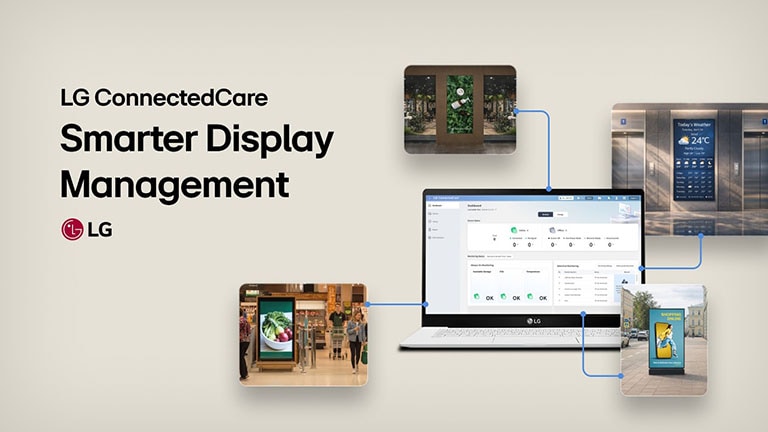
This is an example image featuring an administrator monitoring and managing indoor and outdoor digital signage using the LG ConnectedCare solution.

* All images are for illustrative purposes only.

Remote Management Solution
to Control Signage Displays Worldwide

LG ConnectedCare is a cloud-based solution for remotely managing LG Signage displays anytime, anywhere*. It allows businesses to control displays across multiple locations, designed to help keep devices always ready for use. It monitors real-time status to prevent malfunctions and alerts users to issues, minimizing downtime. Additionally, it provides easy-to-read reports on device operation trends.

* Availability may vary by model. Please contact your local sales office for more details. As a cloud-based solution, LG ConnectedCare relies on internet connectivity, which may affect its performance.

Device Control

LG ConnectedCare supports various device settings and control functions to ensure that digital signage displays operate stably across multiple locations worldwide. Utilizing LG ConnectedCare remote management solution (RMS), grouping different devices to synchronize data automatically becomes easier, as well as presetting the device configurations.

An image presents an administrator efficiently managing digital signage with the LG ConnectedCare solution.

Device Control
(Uni / Quick Controller)

Users can easily configure multiple devices or device groups remotely using either the Uni Controller or the Quick Controller.

Group Setting

It can easily group the devices registered in the workspace based on the location or site where the device is registerd, and the group can be structured with multiple levels of hierarchical depth. This allows users to simply select a group type and configure the device settings simultaneously.

Custom Preset

It allows preset configurations for each target device model, enabling automatic setup when a new device connects to LG ConnectedCare, ensuring consistent settings with a single configuration.

Auto Cloning Data

File and groups can be configured within a group to support cloning data for devices within a group.

Device Monitoring

LG ConnectedCare monitors the status of all devices connected to the workspace. Specifically, users can select various threshold lists such as device humidity, signal loss, impact on the devices, and display fault detection* to check related issues on the LG ConnectedCare home screen, or receive error notification via designated email or SNMP message**. This helps users promptly identify and respond to device problems.

This image illustrates the remote monitoring of in-store signage operation through LG ConnectedCare.
* Display fault detection feature is available with the LG ConnectedCare premium license. ** SNMP : Simple Network Management Protocol. Users can set the NMS (Network Management Server) via LG ConnectedCare to rec.
 

Immediate Notification Settings

Display errors trigger instant notifications via email or SNMP trap messages, with real-time issue tracking available on the LG ConnectedCare dashboard.

Device Status / Security Monitoring

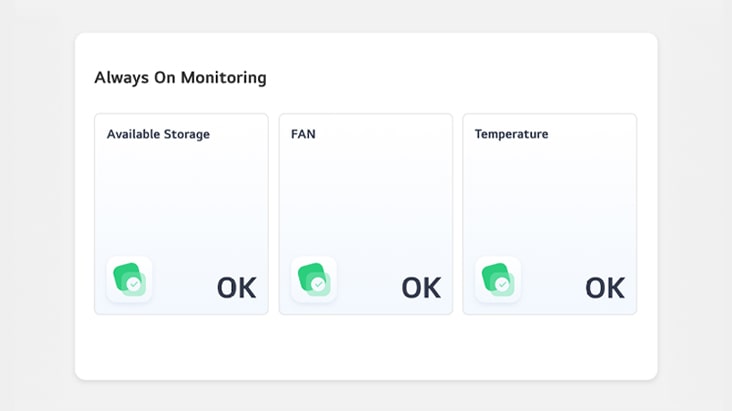
Always on Monitoring

This feature allows users to easily view the status of the display temperature, available storage, and fan malfunctions at a glance.

Selective Monitoring (Thresholds)

It enables users to select from the provided thresholds items* in advance, allowing users to check the dashboard instantly when the designated issue occurs, or receive notification via email or SNMP message.

* For detailed information, please refer to the ‘Selective Monitoring Setting Guide’ provided on the solution screen.

LED Monitoring

The dashboard will display the ‘LED Monitoring’ feature*, providing users with insights into today’s cabinet connectivity, screen temperature error count, and pixel status**.

* Supported LED products may vary. For more details, please consult your local sales team.
** The pixel monitoring feature is available exclusively with the LG ConnectedCare Premium license.

Security Monitoring (Malicious IPs)

The user can keep their device safe by setting up security features. This in advance, restricts the execution of unauthorized app and blocks the malicious IPs on the device.

* The Security Monitoring feature is available exclusively with the LG ConnectedCare Premium license.

LED Status Monitoring

Pixel Defect Detection

Pixel defect detection* is supported for both indoor and outdoor LED** screens, and the total number of detected pixels is provided based on the installed cabinet layout. Users can run LED diagnostics with either running the feature directly or setting a detection schedule it to run.

* This feature is available with the LG ConnectedCare’s premium license. ** Compatible models may vary. For detailed information, please contact your local sales team.

Cabinet Connection

It detects the cabinet connection status of signage device and provides detailed information on the main and sub signal status*. This allows users to easily check the connection direction and status of each cabinet in use.

* There are differences in the information provided between LG signage and outsourcing models. For detailed information, please contact you local sales team.

Temperature (Cabinet / LDM)

By automatically detecting the temperature status of the LED Controller and LDM (LED Display Module), it detects when the temperature exceeds a certain threshold and graphically indicates which area has experienced the temperature anomaly.

* Supports for LG Signage models and outsourcing models. For outsourcing models, it provides graphical representation only for changes in the temperature status of the LED Controller. For compatible devices and further details, please contact your local sales team.

Energy Dashboard

Energy Dashboard

The energy dashboard helps users monitor and manage the energy consumption of their displays more efficiently. It offers detailed insights into each device’s energy consumption, allowing users to compare and evaluate energy consumption data on a daily, weekly, or monthly basis.

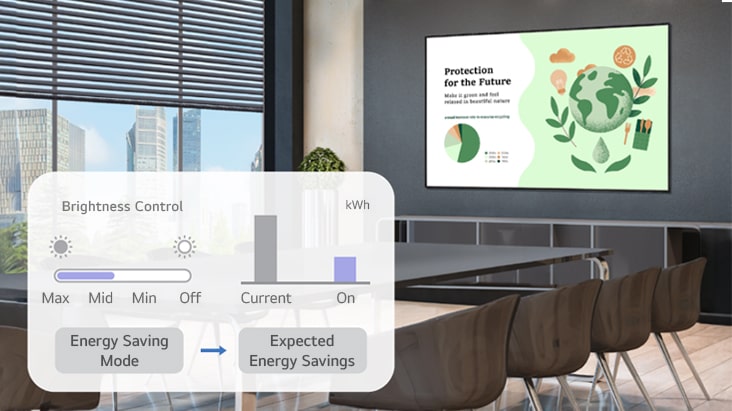
Energy Saving Mode

When Energy Saving Mode is enabled, the display brightness can be automatically adjusted based on the surrounding environment. Furthermore, the solution estimates energy usage for devices while this mode is active.

Energy Cost Calculator

The Energy Cost Calculator provides an estimated cost based on approximate energy usage, allowing users to compare with current costs by adjusting settings such as Energy Saving Mode.

* Estimates energy use and cost for reference. Actual results may vary. Feature availability may vary by country.

Analysis Report

LG ConnectedCare provides customized reports at user-defined intervals (biweekly or monthly) for efficient device monitoring and management.

This is an illustrated image explaining the Analysis Report provided by LG ConnectedCare.

License Status Report

The report provides an overview of license management status, recommendations for other settings, and a history of device operations.

Issue Status, Security Report & Security Guidance

Provides detailed information on device issues within a specific period. It covers the top 3 frequent issues, recorded temperature anomalies, signal loss, fan malfunctions, usage time thresholds, physical impacts, and security incidents, along with guidance on addressing these issues.

Energy Management Report

It provides insights into energy usage trends of connected displays, including annual and hourly consumption, top 5 energy-consuming groups, and devices not using Energy Saving Mode, along with estimated energy savings if enabled. This helps users identify inefficiencies and optimize energy usage.

Abstract red background with large overlapping pink gradient shapes, creating a modern and minimalistic design

Abstract red background with large overlapping pink gradient shapes, creating a modern and minimalistic design

Connect with LG business

We provide customized solutions to help your business achieve optimized growth.