To properly experience our LG.com website, you will need to use an alternate browser or upgrade to a newer version of internet Explorer (IE9 or greater).

The LG.com website utilizes responsive design to provide convenient experience that conforms to your devices screen size. In order to get the best possible experience our LG.COM website please follow below instructions.

If you’re using Internet Explorer 8 or earlier, you will need to use an alternate browser such as Firefox or Chrome or upgrade to a newer version of internet Explorer (IE9 or greater).

If you’re using Internet Explorer 9 and higher, turn off your Internet Explorer browser’s “Compatibility View settings” by following steps below:

  • Right click at the top of your browser and make sure the “Menu Bar” option is selected
  • Select “Tools” from the menu bar and then select “Compatibility View settings”
  • In the pop-up menu uncheck all three boxes and click “Close”
  • Your browser window will automatically refresh and you’ll be ready to go
Skip to Contents Skip to Accessibility Help

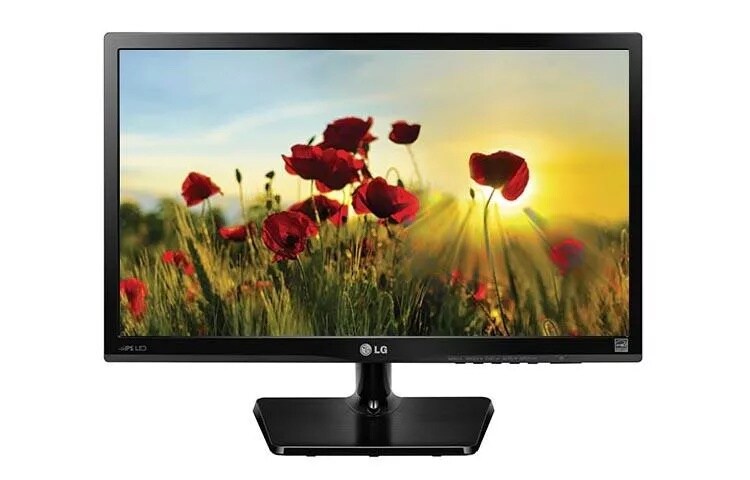
22" Class Full HD IPS LED Monitor (21.5" Diagonal)

  • 22MP47HQ-P

Key Features

  • IPS Display
  • Color Wizard
  • Flicker Safe
  • ENERGY STAR® Qualified
AVAILABLE SIZES:
IPS Display

IPS Display

IPS (In-Plane Switching) technology enhances the performance of liquid crystal displays. Response times are shortened, color reproduction is improved, and users can now view the screen at virtually any angle.

Reader Mode

Reader Mode

Reducing blue light to help lessen eye fatigue, Reader Mode provides optimal condition for reading. With just a touch of a button, you can more comfortably read your monitor screen.

ENERGY STAR® Qualified

ENERGY STAR® Qualified

Earning the ENERGY STAR® rating means that a product meets strict energy efficiency guidelines set by the US Environmental Protection Agency and the Department of Energy. For monitors, it means they save energy both in standby and active (powered on) modes. ENERGY STAR-qualified monitors use about 25% less energy than standard units.

SUMMARY
Screen Size 22"
PICTURE QUALITY
Resolution 1920 x 1080
Panel Type IPS
Aspect Ratio 16:9
Brightness 250 cd/m2
Color Gamut sRGB 72%
Response Time 5ms GTG
Refresh Rate 60Hz
Contrast Ratio (DFC) 5M:1
INTERFACE
HDMI 1
D-Sub 1
FEATURES
Color Wizard Yes
Reader Mode Yes
POWER
ENERGY STAR® Qualified Yes

What People Are Saying

  • bvseo_sdk, java_sdk, bvseo-2.3.0.0
  • CLOUD, getReviews, 182ms
  • REVIEWS, PRODUCT
  • bvseo-msg: The resource to the URL or file is currently unavailable.;

We're here to support you with our product.

View 22MP47HQ-P Product Support

Contact us for any support inquiries.

ASK & ANSWER

Ask your questions. Share your answers.
Please first review the detailed product information and help guides in the Product Support section for this product prior to posting a question.

I would like to hang the monitor upside-down from a low ceiling. Will I be able to flip the image top to bottom?

Asked by: Fishy
There is nothing in the settings for the LG 24" Class Full HD IPS LED Monitor (24" Diagonal), Model # 24MP47HQ-P that enables you to change the orientation of the picture. If your computer has an Intel graphics adapter, you can use keyboard shortcuts to rotate your screen, or you you may be able to rotate the screen in the Screen Resolution or Display Properties window. That will depend on which operating system you have on your computer. The process for rotating screens is dependent on the graphics card that you are using, and your graphics card drivers may override Window' rotation controls. Knowing what graphics card you have will make it easier to find the rotation controls. If you have an NVIDIA graphics card, you can use the NVIDIA Control Panel to rotate the screen. If you have an AMD or ATI graphics card, you can use the Catalyst Control Center to rotate the screen. The most common reason that your display won't rotate is bad or outdated drivers. Updating to the latest drivers will usually restore this option...^IFV
Answered by: LGJoel
Date published: 2016-08-04

Is the 24MP47HQ-P IPS LED Monitor Mac compatible?

Asked by: LBMC
Yes, 24MP47HQ-P full compatible. I'm running it with Mac OSX 10.11 El Captian. However the "leg-dock" of monitor is very weak. When I press the keyboard, "leg-dock" doesn't keep monitor, monitor is shaky. I hope LG will fix it or replace for me a new product
Answered by: TQuang
Date published: 2016-02-23

is there a set of speakers that go with this that i can buy??

Asked by: amontick
LG does not make PC speakers. The ENERGY STAR® Qualified LG 23" Class Full HD IPS LED Monitor (23" Diagonal), Model # 23MP47HQ-P has a 3.5mm headphone port which you can use either with headphones or use to connect to active or passive computer speakers. When you bring up the OSD Menu, there is an Audio setting that allows you to control the volume to the headphone port if you use passive speakers. Active Speakers in most cases have their own volume control on them. You will find PC speakers at most Consumer Retail Stores that carry computers and definitely at Computer Stores...^IFV
Answered by: LGJoel
Date published: 2016-02-12

Where is the audio headphone jack ? I cannot find anywhere on back of monitor. Model 24MP47HQ

Asked by: Brian H
We regret the inconvenience you have experienced with this monitor. According to the information on page 7 and page 18 of the owner’s manual, it appears that this particular model does not have a headphone jack available. For this manual, this feature is only available on the 22MP47HQ and the 23MP47HQ.
Answered by: NeilE
Date published: 2015-12-16

ARE THERE SPEAKERS ON THE LG 22MP47HQ MONITOR

Asked by: GEOL
No.
Answered by: J R R
Date published: 2015-10-01

computer monitors

We are looking to purchase computer monitors for work, and I was told that there are some LG monitors that can be mounted on walls? We're looking for monitors that are about 20-24 inches wide that we can mount on to walls to save desk space. What do you have that will allow us to do that? Also, what type of mounting equipment would we need? Thanks!
Asked by: shart
This monitor has a standard VESA 75mm x 75mm mount.  Use any standard type of wall mount that supports the 75x75 VESA standard.  There are hundreds of models on the market, check with any store that sells TVs.
Answered by: Gorilla
Date published: 2015-09-21

I just installed the LG Monitor LED 22MP47A successfully.  However, I have no sound.

Asked by: Jorge0915
This monitor takes audio (and video) from the HDMI input, but has no speakers.  The audio out (headphone) jack on the back of the monitor is the only way to get the sound.  Plug in some headphones or external speakers to get sound.  The monitor's menu has an option for audio volume control, and controls the headphone/external speaker's audio output volume.  Make sure your computer's audio is directed to the HDMI cable going to the monitor or you'll get no sound. Also see the second response to the similar question above from Dummyup (looks like it's from an LG employee): "Thank you for your inquiry on the LG 23" Class Full HD IPS LED Monitor (23" Diagonal), Model # 23MP47HQ-P. This monitor does not have built-in speakers, but it has a 3.5mm headphone port which you can use either with headphones or use the port to connect to active or passive computer speakers. When you bring up the OSD Menu, there is an Audio setting that allows you to control the volume to the headphone port"
Answered by: Gorilla
Date published: 2015-09-21

Any chance that the 4 holes on the back of this monitor to be VESA mount. Cant find anything about that on specs.

Asked by: dman1q
according manual 24" monitor has no VESA mount.
Answered by: derice bannock
Date published: 2015-09-21
  • 2016-10-25T10:41CST
  • bvseo_cps, prod_bvqa, vn_cps_3.4.0
  • cp_1, bvpage1
  • co_hasquestionsanswers, tq_13
  • loc_en_US, sid_MD05175420, PRD, sort_recentAnswersFirst
  • clientName_LG
  • bvseo_sdk, java_sdk, bvseo-2.3.0.0
  • CLOUD, getContent, 4ms
  • QUESTIONS, PRODUCT