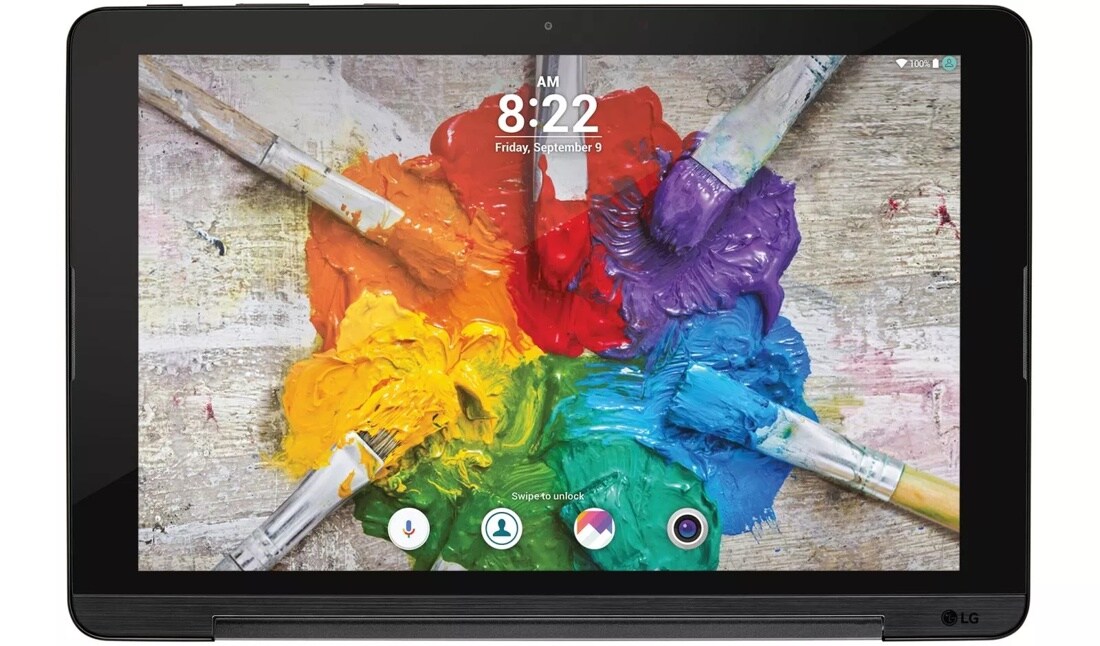
Key Features
- Expansive, Immersive Hi-Res Screen
- Convenient Kickstand for Easy Viewing
- Read, View, and Browse with Less Eyestrain
- Mirror the Screen of Other Devices
- Customize Screensaver with Personal Photos
10.1" TFT WUXGA Display
Gather around this entertainment hub and bring every story to life in bright color and vibrant clarity.
Built-In Stand
Sit back and relax while you enjoy your G Pad—the slim, metallic body is easily propped up using the kickstand.
Reader Mode
Get lost in e-books and browse to your heart’s content with a screen that reduces intensity and helps alleviate eyestrain.
| Built-in Stand | Unfold for easy tabletop use |
|---|---|
| Reversible USB Type-C™ Connector | Yes |
| Customizable Home Touch Buttons | Includes Notifications, QSlide Function,™ Capture+, Dual Window, and customizable color settings |
| LG UX 5.0 Home Screen | Conveniently access all apps from the home screen |
| Shortcut Key | Open camera or Capture+ with the volume keys when screen is locked or off |
| QuickButton | Set an app to open when the QuickButton key is pressed |
| Reader Mode | Decreases amount of blue light on the screen to help reduce eyestrain |
|---|---|
| Q Pair® | Link your tablet and Android smartphone so notifications can be used between both* |
| Dual Window | Use two apps simultaneously on a split screen |
| Do Not Disturb | Turn off all notifications except chosen ones |
| Knock Code® | Create a 6-8 point tapping pattern for superior security and direct access to the home screen |
| Knock On® | Put your tablet to sleep or wake it by doubletapping the screen |
| Smart Lock | Tablet stays unlocked with a trusted Bluetooth® device connected, when it’s in a familiar location, a certain voice or face is detected, or you carry it with you |
| Capture+ | Write or draw on nearly any screen and save to QuickMemo+ or Gallery |
| QuickMemo®+ | Take notes with ability to choose paper style, pen size and color, add text with a PC-like tool bar, add location reminder, and more |
| Smart Keyboard | Adjust keyboard height and layout; choose split or floating keyboard options |
| Clip Tray® | Copy multiple items and paste in a clipboard at the bottom of the screen, creating a collection of information to save or send |
| QSlide Function | Overlay up to two windows with adjustable sizing and transparency on the primary screen |
| Multilanguage Support for Tablet and Keyboard Input | Yes |
| Microsoft Office® | View and work on documents, presentations, and spreadsheets |
| Google Chrome™ | Full mobile web browser |
| Guest Mode | Add user profiles with specific apps and content or restricted access |
| Smart Cleaning® | Free up space by deleting temporary files and removing infrequently used apps |
| Smart Notice | Cards provide customized suggestions based on time of day, location, and how the tablet is used |
| Content Lock | Password/pattern protect memos in Capture+ and Gallery** |
| * | Android 4.1 or higher. Some features may be unavailable due to carrier policy or device incompatibility. |
| ** | Some owner content may still be accessible to a user who enables Content Lock. |
| 5 MP Rear-Facing Camera | Yes |
|---|---|
| Camera Resolutions | Up to 2560 x 1920* (2560 x 1600 default) |
| Burst Shot* | Hold the shutter button to take multiple shots quickly |
| Zoom* | Up to 4x |
| 5 MP Front-Facing Camera and Full HD Camcorder | Yes |
| Swipe Finger to Switch between Cameras | Yes |
| Auto Shot** | Take selfies automatically using face detection |
| Gesture Shot** | Take selfies with a simple hand gesture |
| Gesture Interval Shot** | Make a fist twice to take four selfies in sequence |
| Selfie Light** | Soft light around the photo preview for selfies |
| Film Effect | Pre-set filter effects to give photos a film-like look and feel |
| Timer | Set shutter delay to 3 or 10 seconds. |
| Multiple Shutter Options | Tap the shutter, use your voice, tap the screen, or press a volume key to take a photo. |
| Full HD Rear-Facing Camcorder | Yes |
| Video Resolutions | Up to 1920 x 1080* |
| Pause & Resume Recording | Pause and start in record mode for one continuous video file. |
| Live Shot | Take still shots while recording video. |
| Video Screenshot | Capture still shots from a video during playback. |
| Image Editor | Add filters, adjust brightness, and more |
| Edit Videos with Trim | Yes |
| Quick Share | Access social platforms instantly after taking pictures and videos |
| Geotagging | Tag location information in photos and videos |
| * | Available only on rear-facing camera or camcorder |
| ** | Available only on front-facing camera or camcorder |
| 10.1" TFT WUXGA Display | Yes |
|---|---|
| Video Player with Touch Lock and Resume Play Function | Supports 3GP, 3G2, DivX,® WMV, MKV, WebM, AVI, ASF, FLV, and MP4 formats |
| Customizable Video Screen Ratio, Subtitle, Settings, and Play on Other Device Functions | Yes |
| Music Player with Custom Audio Effects and Stereo Speaker | Supports MP3, M4A, AAC, AAC+, eAAC+, MIDI, WAV, WMA, AMR, FLAC, MP2, Dolby AC-3, and Ogg formats |
| Customizable Music Library | Organized by songs, albums, artists, genres, favorites, playlists, and folders; access nearby devices and the Cloud |
| QuickRemote® | Control compatible TVs and cable provider set-top boxes |
| Media Device (MTP) | Transfer files or synchronize with Windows® Media Player* |
| Accelerometer | Control games by turning and tilting** |
| * | USB cable required (included). |
| ** | Only available on certain interactions with the touch screen. |
| U.S. Cellular 4G LTE Network* | Yes |
|---|---|
| SmartShare Beam | Wirelessly receive multimedia content from compatible LG devices. |
| File Sharing | Receive images, videos, and more from nearby devices via BLE |
| Bluetooth® Wireless Technology Version | 4.2 |
| Wi-Fi® Connectivity | 802.11 a/b/g/n/ac |
| Wi-Fi Hotspot** | Share a 4G LTE data connection with compatible wireless devices |
| USB*** and Bluetooth Tethering | Share your tablet’s Internet connection with your computer** |
| MIDI Device*** | Make music with the tablet |
| LG AirDrive**** | Wirelessly share content with a computer using your LG account |
| Screen Sharing and Monitor Mode | View your tablet’s content on a compatible larger screen and or view another device’s screen on your tablet using Miracast® |
| Media Server | Allow compatible nearby devices to access your content via DLNA®. |
| Wi-Fi Direct® | Connect directly to devices via Wi-Fi |
| S-GPS, A-GPS, and Qualcomm® Service for Enhanced Location Accuracy | Yes |
| * | U.S. Cellular’s 4G LTE Network not available everywhere. |
| ** | U.S. Cellular service required. Product features subject to change. Features based on carrier program availability. Additional charges may apply. |
| *** | USB cable required (included). |
| Display | 10.1" (1920 x 1200) TFT WUXGA |
|---|---|
| Battery | 6,000 mAh Embedded |
| Platform | Android 6.0.1 Marshmallow |
| Processor | Qualcomm Snapdragon™ MSM8952 1.5 GHz + 1.2 GHz Octa-Core |
| Technology | LTE |
| Network | LTE, WCDMA |
| Frequencies | LTE Bands 2/4/5/12/25; WCDMA 1/2/5 |
| Data Transmission | LTE, UMTS, HSPA+, HSPA |
| Size & Weight | 6.61" (H) x 10.09" (W) x 0.26 ~ 0.31" (D) 17.99 oz. |
| Standby Time | Up to 25 days* |
| Internal Memory | 16 GB (up to approx 9.16 GB usable) |
| microSD card | Support up to 2 TB** |
| RAM | 2 GB |
| * | Actual battery time may vary depending on network connectivity and application use |
| ** | microSD cards sold separately. |
| Travel Adapter and USB Cable* | Yes |
|---|---|
| Bluetooth Stereo Headset | (LG TONE PRO™, LG TONE ULTRA™, LG TONE Active™, LG TONE INFINIM™, LG TONE PLATINUM™ ) |
| * | Included with tablet. |
What People Are Saying
Accessories
We're here to support you with our product.
View UK750 Product Support-
Warranty Information
View manufacturer warranty information
-
Register Your Product
Get the most out of your ownership
-
Manuals and Downloads
Download owner's manuals and documentation
-
Help Library
Help yourself to helpful product information
-
Video Tutorials
Learn how to install & operate your LG product
-
Request a Repair
Submit an online service request
-
Other Support Options
More help with your LG product
Contact us for any support inquiries.
-
Live Chat
Chat with an LG Support Representative.
Weekdays 8am-8pm CST -
Telephone
Call an LG Support Representative.
(800) 243-0000 Consumer (6am-midnight CST)
-
Email
No time to chat? Send LG Support your inquiry.
ASK & ANSWER
Ask your questions. Share your answers.
Please first review the detailed product information and help guides in the Product Support section for this product prior to posting a question.