• Enter ZIP for Estimated Delivery
Add to Wishlist

KEY FEATURES

  • 4K UHD (3840 x 2160) Resolution
  • Up to 300’’ of Projection Screen Size
  • Dual Laser with Lens Shift
  • 2700 ANSI Lumens
  • 2,000,000:1 Contrast
  • HDR10 & HLG

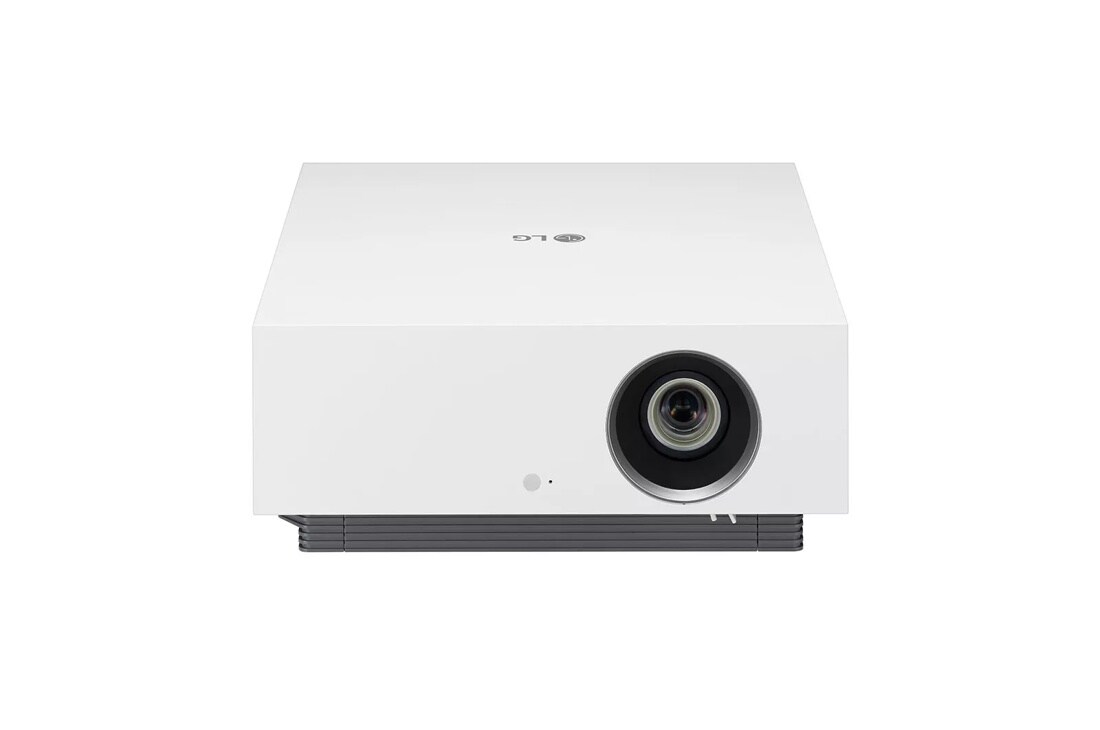
LG HU810PW 4K UHD Laser Smart Home Theater CineBeam Projector
$ 2,999.99
pjt-na-cinebeam-hu810pw-banner-01
"The eye-opener for home theater enthusiasts" - AVS Forum, 5/21/21
*CES® Innovation Awards are granted to products based upon materials submitted by the honorees. CTA neither verifies the accuracy of any submission nor tests any products.
  • Performance

    8.3 Mega Pixels Real 4K UHD
    DCI-P3 97%* Dual Laser (Red & Blue)
    2,000,000:1 Contrast Ratio Black Level

  • Imaging Technology

    Brightness Optimizer
    - Iris Mode
    - Adaptive Contrast

  • Usability

    webOS
    AirPlay
    Screen Share

*The rate may vary by picture modes.

Real 4K UHD Laser Projector

Exceptional Picture Quality

With 8.3 mega pixels utilizing 4K UHD Laser technology, LG CineBeam delivers impeccable precision and detail up to 300-inch screen. With 2,000,000:1 contrast ratio Black level, it can express the deep black. And it accurately represents colors, thanks to a wide color gamut 97% of DCI-P3*.

  • 8.3M Pixels

    Real 4K UHD

  • DCI-P3 97%*

    Dual Laser (Red & Blue)

  • 2,000,000:1

    Contrast Ratio Black Level

  • Images of FULL HD Images of FULL HD

    FULL HD

  • Image of UHD 4K 8.3 Megapixel Image of UHD 4K 8.3 Megapixel

    UHD 4K 8.3 Megapixel

*The rate may vary by picture modes.

Iris Mode

Designed for Both Bright and Dark Environment

Depending on lighting condition of viewing environment, you can change iris mode.

  • Dark indoor environment Dark indoor environment

    ← Iris’s maximum aperture

  • Bright indoor environment Bright indoor environment

    Iris’s minimum aperture →

  • Dark Room Mode

    Optimized brightness for dark room. Recommended white brightness + lowest (best) black level with iris’s min. aperture.

  • Bright Room Mode

    White and black goes up together, which makes picture visible and vivid with iris’s max. aperture.

HDR pro

Covers HDR10, Dynamic Tone Mapping, HLG and HGiG

HDR pro improves quality by making the bright part brighter and the dark part darker while using the dark side details. So it is compatible with almost HDR industry standards.

*HDR pro covers almost all HDR specifications, including HDR10, Dynamic Tone Mapping, HLG, HGiG and other specifications.

Lens Shift & Zoom x1.6

Flexible and Easy Installation

With Lens Shift (V ± 60%, H ± 24%) & Zoom x1.6 functionality, you can install the device virtually anywhere and set the screen to the exact size and location.

  • Lens Shift V ± 60%, H ± 24%

  • Zoom x1.6

Introduce the Latest Technologies for Home Cinema Specialists

  • eARC

    eARC delivers up to 32 channels of audio, including 8-channel, 24-bit/192KHz uncompressed data stream at speeds of up to 38Mbps.

  • HDMI 2.1

    The projector displays hi-resolution and hi-information images by HDMI 2.1 connection, can output 10-bit images with 444RGB specifications.

AirPlay + Miracast® + Bluetooth

Advanced Wireless Connection

You can share the screen and sound conveniently with AirPlay (for iOS devices), Screen Share (for wireless Miracast® supporting devices) and Bluetooth pairing.

PROJECTION SYSTEM

    • Display Type
    • DLP
    • Native Resolution
    • 4K UHD (3840 x 2160)*
    • Upscaling / Super Resolution
    • Yes
    • Projection size (Screen Size)
    • 40" ~ 300"
    • Projection Image
    • 150"@14.1 ~ 22.6ft, 100"@9.5 ~ 15ft, 40"@3.6 ~ 5.9ft
    • Aspect Ratio
    • 16:9/Original/Full Wide/4:3/Vertical Zoom
    • Optical Zoom
    • x 1.6
    • Iris
    • Yes
    • Adaptive Contrast
    • Yes
    • Lens Shift
    • Vert ± 60% Horiz ± 24%
    • Focus (Auto / Manual)
    • Manual
    • Throw Ratio
    • 1.3 - 2.08
    • Projection Offset
    • 0% (+110% ~ -110%)
    • Brightness (ANSI Lumen)
    • Up to 2700 ANSI Lumens**
    • Contrast Ratio
    • 2,000,000:1
    • Light Source
    • Dual Laser (R LD, B LD + G Phosphor)
    • Light Source Life
    • Up to 20,000 Hrs
    • Noise (Eco / Nrmal / High brightness)
    • 26/27/28dB (A)
    • HDCP
    • HDCP2.2 (HDCP 2.3 Compatible)
    • Trumotion
    • Yes
    • HDR
    • HDR10, HLG
    • Digital Keystone Correction
    • Manual Keystone (Vertical)
    • *
    • 4K UHD resolution with 8.3 million discrete pixels projected by XPR (Expanded Pixel Resolution) video processing
    • **
    • The brightness (ANSI Lumen) is based on the perceived brightness of projected image

LG SMART TV

    • Premium content providers
    • Apple TV, Amazon Prime Video, Disney+, YouTube, SHOWTIME, STARZ, AMCTheatres On Demand***
    • Magic Remote
    • Yes
    • App Store
    • Yes
    • Web Browser
    • Yes
    • Voice Recognition Built-In
    • LG ThinQ + Google Assistant + Amazon Alexa
    • ***
    • Some apps may be available via software update, which requires internet connection

CONNECTIVITY/WIRELESS

    • Bluetooth (with Speaker)
    • Yes
    • Screen Share / Screen Mirroring (with Miracast supporting device)
    • Yes
    • Wireless Contents Share (with DLNA supporting device)
    • Yes
    • Apple Airplay
    • Yes

AUDIO

    • Bluetooth® Sound Out
    • Yes
    • Built-in Speakers
    • 10W (5W+5W Stereo)
    • Bluetooth AV Sync Adjustment
    • Yes
    • Dolby Atmos compatible
    • Yes

INPUTS/OUTPUTS

    • Audio out
    • S/PDIF 1 (Optical)
    • HDMI™
    • 3 (HDMI2.1* : 1EA/HDMI2.0 : 2EA) *ALLM (Auto Low Latency Mode), eARC (Enhanced Audio Return Channel), up to 24Gbps (input)/4:4:4/RGB 10 bit (output)
    • USB Type A
    • 2 (USB2.0)
    • RJ45
    • 1
    • HID (Keyboard/Mouse/GamePad Connection Thru USB)
    • Yes

POWER

    • Power Supply (Voltage/Hz)
    • 100V – 240 V @ 50~60 Hz (PSU Built-in)
    • Power Consumption
    • 300W
    • Standby Mode
    • <0.5W

ACCESSORIES/MANUAL

    • Remote Control
    • 1 Magic Remote (Backlit, Battery included)
    • Manual
    • Simple Book
    • Warranty Card
    • Yes
    • Adaptor
    • (PSU built-in)
    • Power Cord
    • Yes

DIMENSIONS/WEIGHT

    • Product (WxHxD)
    • 13.3" x 16.1" x 5.7"
    • Shipping Dimensions (WxHxD)
    • 21.5" x 20.7" x 10.6"
    • Weight
    • 24.3 lbs
    • Shipping Weight
    • 30.9 lbs

WARRANTY/UPC

    • Limited Warranty
    • 1 Year Parts & Labor
    • UPC
    • 195174004876

What people are saying

Rated 5 out of 5 by from Fantastic Projector I bought the LG projector to replace the excellent but old Sharp projector. While I was very happy with the sharp, I did not expect that I would be blown away by the quality of the picture that the LG produces. It's out of this world. Colors and true, bright and vivid. Every show that we see looks so much better. I highly recommend this projector. I have old Onkyo preamplifier and amplifier set up which are unable to pass through 4k signal. SO I use the LG as a receiver and loop back the audio signal to the Onkyo processor via optical cable. This setup works really well. There are 3 HDMI inputs which are really good.
Date published: 2022-03-21
Rated 4 out of 5 by from Sharp and realistic I'm only going to get four stars because I had it for a short time at the movies and the picture overall quality is beautiful it's really realistic it's actually better than most tvs
Date published: 2022-02-09
Rated 1 out of 5 by from Lack of support and major issues with HDR This projector has been out for nearly a year and has yet to receive a firmware update. There are a number of issues that could easily be addressed by an update (24p handling, audio lag, crushed dark details for HDR content, overly blue picture out of the box). I needed to buy an expensive Blu ray player with HDR optimization capabilities to make my 4k HDR discs watchable. Additionally my unit came with a lens defect that needed repair services leaving me with an empty home theater for an extended period of time. The zoom and lens shift mechanisms are clunky at best. This projector could be good, possibly great IF LG chose to support it and listen to their customers. Will not be purchasing from LG in the future.
Date published: 2022-01-19
  • y_2022, m_4, d_7, h_21
  • bvseo_bulk, prod_bvrr, vn_bulk_3.0.24
  • cp_1, bvpage1
  • co_hasreviews, tv_0, tr_28
  • loc_en_US, sid_MD07515908, prod, sort_[SortEntry(order=SUBMISSION_TIME, direction=DESCENDING)]
  • clientName_lg
  • bvseo_sdk, java_sdk, bvseo-4.0.0
  • CLOUD, getReviews, 11ms
  • REVIEWS, PRODUCT

Choose a support option below:

BUY DIRECTLY FROM LG

HU810PW
$2,999.99
In Stock
Sold and Fulfilled by LG

ASK & ANSWER

Ask your questions. Share your answers.
Please review the detailed product information and help guides in the
Product Support section for this product prior to posting a question.

I have a proojector currently that cost a lot but the lens scrathed at the touch of microfiber and lens cleaner. Is the projector lens made from plastics or glass?

Asked by: wowkool2
The surface for the lens on the LG HU810PW 4K UHD Laser Smart Home Theater CineBeam Projector should be cleaned with an air sprayer or a soft, dry cloth To remove dust or stains on the lens, use a compressed air duster, cotton swab, or soft cloth to gently wipe the lens. Regrettably, LG does not divulge information for what material the lens is made of...^Ivan
Answered by: Ivanf
Date published: 2021-08-23

What is the total height? Will it fit in a 7 inch tall space?

Asked by: Iane
The W x H x D dimensions for the LG HU810PW 4K UHD Laser Smart Home Theater CineBeam Projector, Model # HU810PW are listed under DIMENSIONS/WEIGHT in its specifications on its product detail page on our site and the height is listed as 16.1&quot;...^IFV
Answered by: Ivanf
Date published: 2021-07-08

Does the HU810P require calibration software or equipment?

Asked by: Matt D
Dynamic Contrast, Dynamic Tone Mapping, Dynamic Color, Color Gamut, Super Resolution, Gamma, White Balance are configurable settings under Adnavced Controls on the LG HU810P 4K UHD Laser Smart Home Theater CineBeam Projector. Under White Balance, [Method] is used for fine-tuning the color temperature setting. You can control the color temperature at two points of the bright part and dark part of the video if you select [2 Points], at each point of 10 levels if you select [10 Points IRE], and at each point of 22 levels of the video if you select [22 Points IRE].&ndash;[Point]: Select screen brightness for color temperature adjustment.If [Method] is set to [2 Points]; use Low to select shadows and High to select highlights.&ndash;[IRE]: Select screen brightness for color temperature adjustment.When the [Method] is set to [10 Points IRE], you can select the brightness with the 10 levels of brightness.When the [Method] is set to [22 Points IRE], you can select the brightness with the 22 levels of brightness.&ndash;[Target Luminance]/[Adjusting Luminance]: You can adjust the selected brightness by points.&bull; You can do these settings only when the [Picture Mode] is the [Expert (Bright Room)] or the [Expert (Dark Room)] and when the [Method] is set to [10 Points IRE] or [22 Points IRE].&ndash;[Red]/[Green]/[Blue]: Adjust the color temperature of the selected point.Adjust the intensity of [Red]/[Green]/[Blue] in the range of -50 to 50.You can adjust respective values for the brightness selected in [Point].&bull; [Color Management System]This is used when experts control it by using a test pattern. You can control it by selecting areas of six colors ([Red]/[Green]/[Blue]/[Cyan]/[Magenta]/[Yellow]).For normal images, adjustments may not result in noticeable Color changes.&ndash;[Color]: From [Red]/[Green]/[Blue]/[Cyan]/[Magenta]/[Yellow], select a tone to adjust.&ndash;[Saturation]/[Tint]/[Luminance]: Adjust the chroma/tint/luminance of the tone in the range of -30 to +30...^IFV
Answered by: Ivanf
Date published: 2021-09-03

Is 3D video capability being planned/considered in a near-future firmware update? This is the only missing feature keeping me (and i'm not alone on this) from pulling the trigger on a purchase. Thanks.

Asked by: danno678
As with the LG AU810PB 4K UHD Smart Dual Laser CineBeam Projector, the LG HU810P 4K UHD Laser Smart Home Theater CineBeam Projector would need a hardware update for it to support 3D, it cannot be upgraded via a firmware update. LG has not made any announcements about any plans for offering any 3D projectors in the near future...^IFV
Answered by: Ivanf
Date published: 2021-09-06

When will it be shipping regularly ? I ordered mine fromhttps://www.bhphotovideo.com/ ... in early Feb, still not shipped

Asked by: D Chhetri
Regrettably, we do not have access to shipping information and do not have a date for when the LG HU810P 4K UHD Laser Smart Home Theater CineBeam Projector will be shipped. OIn its product detail page on our site is a 'Notify Me When Available' link that you can use to submit your email so you can receive alerts when we have it back in stock...^IFV
Answered by: Ivanf
Date published: 2021-03-22

Is there an easy way to connect surround sound speakers to this projector. Wireless option? Or does the cable has to be run under the under drywall/floor to the projector location and plugged in at the source?

Asked by: MikeSK
The Bluetooth&reg; Sound Out for the LG HU810P 4K UHD Laser Smart Home Theater CineBeam Projector is a feature that you can use to connect wirelessly to a Bluetooth audio device or a Bluetooth headset to enjoy your projector&rsquo;s sound in richer quality and greater convenience. However, keep in mind that Bluetooth does not support more than 2 channels (although enhanced aptX (Bluetooth) does support 5.1 surround sound but is not supported on this projector). The projector does have an HDMI eARC port that can be connected to external audio systems that also feature an HDMI eARC port or an HDMI ARC port for 5.1 Surround Sound. How you run the cables is at your discretion and will depend on the layout of where you install the projector and its surroundings...^IFV
Answered by: Ivanf
Date published: 2021-03-18

4.-There is no recommendation in the installation in relation to the space to be kept laterally for ventilation. 5.-The gamma of the highlights, midtones and shadows cannot be adjusted independently. Can you confirm?

Asked by: biogons
Page 7 of the owner's manual for the LG HU810P 4K UHD Laser Smart Home Theater CineBeam Projector states &quot;Install the air vents at least 30 cm (11.8 inches) away from the wall.&quot; The last bullet on page 55 in the owner's manual gives a description of [Gamma] and how it adjusts the medium brightness of the picture and advises to select [Low] for a bright picture, select [High1] or [High2] for a dark picture or select [Medium] for medium brightness. [Expert (Bright Room)]/[Expert (Dark Room)] can be selected from [1.9]/[2.2]/[2.4]/[BT.1886].&ndash;[High2]/[BT.1886] expresses the gradation in ITU-R BT.1886, which is an international standard...^IFV
Answered by: Ivanf
Date published: 2021-09-03

Why are Netflix and Hulu not listed as apps, while Amazon Prime is? &nbsp;You have to sign into app store with ID on device to see what apps are compatible. &nbsp;Does that mean we have to buy the projector to find out what content we have available?

Asked by: Anonymous
Only the apps that are compatible with the LG HU810P 4K UHD Laser Smart Home Theater CineBeam Projector and are preinstalled on the projector are listed in the product's specifications. Unfortunately, not every app that is compatible or available on our TVs is available or compatible with our projectors. You can view a list of over 600 apps that are offered through our webOS Platform at https://us.lgappstv.com/main, but as you noted, you have to sign into the App Store on the device to see which apps are compatible with the projector. Since the Netflix and Hulu apps are not listed, it is safe to assume that neither app is compatible with the projector and is not available for download from the LG Content Store...^IFV
Answered by: Ivanf
Date published: 2021-09-03
  • y_2022, m_4, d_7, h_21CST
  • bvseo_bulk, prod_bvqa, vn_bulk_3.0.24
  • cp_1, bvpage1
  • co_hasquestionsanswers, tq_35
  • loc_en_US, sid_MD07515908, prod, sort_[SortEntry(order=LAST_APPROVED_ANSWER_SUBMISSION_TIME, direction=DESCENDING)]
  • clientName_lg
  • bvseo_sdk, java_sdk, bvseo-4.0.0
  • CLOUD, getContent, 5ms
  • QUESTIONS, PRODUCT

Compare (0)