Top Deals: Save 30-50% on select home appliances

Top Deals: Save 30-50% on select home appliances
Full HD & QHD Monitors
Full HD & QHD Monitors for the Way You Work and Play
LG Full HD and QHD monitors are designed to help you stay productive, connected, and entertained with sharp visuals and dependable performance. Browse a wide selection of computer monitors for your home office, workspace, or everyday setup, with the screen sizes, resolutions, and features to fit your needs.

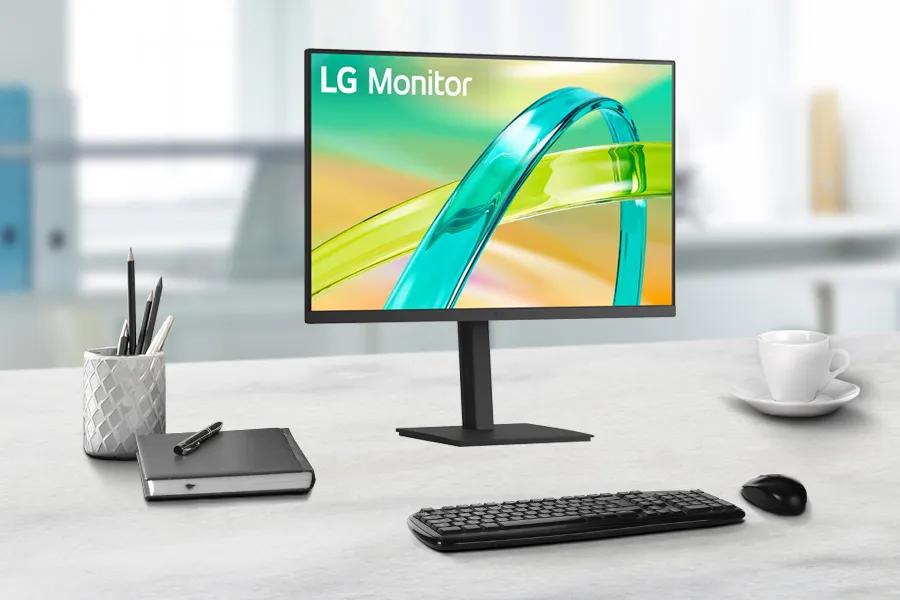
Brilliant Clarity with LG Full HD Monitors
LG Full HD (FHD) monitors bring you clear, detailed images for everything you do. Whether you’re working, watching movies, or gaming, LG’s 1080p displays balance performance and value with excellent color accuracy and brightness. Designed for everyday use, these monitors deliver the sharp visuals and smooth experience you expect from a trusted brand.
What Makes Full HD LG Monitors Stand Out
FHD, or 1080p, refers to a display resolution of 1920 x 1080 pixels. This standard provides crisp visuals and balanced performance for most computing needs. LG 1080p monitors offer vibrant colors, deep contrast, and wide viewing angles, thanks to IPS technology. They’re ideal for tasks like browsing, streaming, or working on creative projects that demand clarity without overstraining your eyes.
For more advanced features, explore LG UltraGear™ gaming monitors for higher refresh rates or LG UltraWide™ monitors for multitasking productivity.
FHD Designed for Work, Play, and Comfort
SLG Full HD monitors are engineered for comfort and flexibility. The flicker-safe and Reader Mode settings reduce blue light and screen flicker, helping you stay focused for longer periods. Adjustable tilt, height, and swivel options make it easy to create an ergonomic setup that suits your workspace.
If you’re into entertainment, FHD resolution keeps your videos, photos, and streaming content looking sharp. Many LG monitors also feature built-in speakers, slim bezels, and AMD FreeSync™ technology for a smoother visual experience with minimal lag.
Energy-Efficient and Sleek Design
Beyond performance, LG FHD monitors are crafted with style and sustainability in mind. The slim, minimalist designs fit effortlessly into modern desks and home offices. Many models are ENERGY STAR® certified, helping you save energy without compromising on performance.
Looking for an upgrade? Discover the LG 4K monitors and LG 5K Monitors lineup for ultra-high definition displays that take visual detail to the next level.
A Trusted Choice for Every Space
From home offices to dorm rooms, LG Full HD monitors adapt easily to your lifestyle. Their sleek frames and compact footprints make them ideal for smaller desks or dual-monitor setups. Many models feature wall-mount compatibility through VESA support, giving you even more control over your workspace. Whether you need a second screen for creative projects or a primary display for streaming and gaming, LG’s 1080p monitors combine great design, performance, and reliability at a value that fits every budget.
FHD Monitors FAQs
Q: What is Full HD on a monitor?
A: Full HD, or 1080p, refers to a screen resolution of 1920 x 1080 pixels. It provides clear, detailed images suitable for most tasks, including office work, streaming, and gaming.
Q: What is better, 1920x1080 or 2560x1440?
A: 2560x1440, also known as QHD, offers higher resolution and sharper visuals. However, 1920x1080 (Full HD) is still a great option for smoother performance and lower power use, especially for smaller screens.
Q: What size monitor is best for Full HD?
A: Most users find 21–27-inch screens ideal for Full HD resolution. This range keeps text and visuals sharp without requiring scaling adjustments.
Q: Is 1920x1080 Full HD or 2K?
A: 1920x1080 is Full HD. 2K typically refers to resolutions around 2048x1080 or 2560x1440, offering more pixels and sharper image quality.
Q: What’s the difference between Full HD and 4K monitors?
A: Full HD offers 1920 x 1080 pixels, while 4K offers 3840 x 2160 pixels for higher clarity. 4K monitors are ideal for detailed work and next-gen gaming, while FHD remains the best value for general use.
Sharper Images, Smoother Workflows with QHD Monitors
LG QHD monitors bring clarity and color together in perfect balance. With 2560x1440 resolution, these 1440p displays reveal finer details and sharper visuals than Full HD, helping you stay productive and creative at the same time. Whether you’re gaming, editing, or streaming, LG QHD monitors deliver smooth motion and accurate color reproduction so you can see everything clearly.
2K Monitors Built for Everyday Use and Creative Focus
If you spend long hours in front of your screen, image quality and comfort both matter. LG’s advanced IPS technology provides consistent color and brightness across wide viewing angles. You’ll see accurate tones whether you’re designing graphics or watching movies. Reader Mode and Flicker Safe features provide the right amount of comfort, while adjustable stands let you tilt and position your monitor for an ergonomic fit.
For multi-monitor setups, QHD monitors offer just the right amount of resolution and screen real estate. Need a wider view? Check out LG UltraWide™ monitors for even more workspace.
Gaming-Ready with High Refresh Rates
Gamers love the sweet spot that QHD hits—sharper visuals than 1080p and smoother gameplay than 4K. With AMD FreeSync™ and NVIDIA G-Sync® compatibility, LG QHD monitors keep your visuals stutter-free during fast-paced scenes. Whether you play on PC or console, 1440p resolution gives you immersive detail without sacrificing frame rates.
Looking for a performance boost? Explore LG UltraGear™ gaming monitors to find QHD models with faster response times, HDR support, and refresh rates up to 165Hz.
Seamless Setup and Smart Connectivity
LG QHD monitors come equipped with the ports you actually need: HDMI, DisplayPort, and USB-C for single-cable convenience. They fit easily into home offices and creative studios, connecting to laptops, desktops, and even tablets. The slim bezels and modern designs help your workspace look clean and focused.
Need more resolution for professional color work or 3D rendering? Explore the LG 4K monitors and the LG 5K Monitors lineup for all your 3D rendering needs.
Still unsure? Chat with an LG Product Specialist and get expert help!
Why Choose QHD Monitors?
QHD, also known as 1440p or 2K, bridges the gap between Full HD and 4K. You get more pixels, more workspace, and more clarity without pushing your system’s limits. It’s ideal for users who want sharp visuals for work and smooth frame rates for gaming—one display that does it all.
QHD Monitors FAQs
Q: What is a QHD monitor?
A: QHD stands for Quad High Definition. It has a resolution of 2560x1440 pixels, offering four times more detail than standard HD and a noticeable step up from Full HD.
Q: Is QHD the same as 1440p or 2K?
A: No, QHD and 2K are not the same, but they are often used interchangeably in consumer markets. QHD is a specific resolution of \(2560\times 1440\) pixels, while "2K" technically refers to the cinematic standard of \(2048\times 1080\) pixels. However, many manufacturers and consumers call QHD (\(1440p\)) "2K" because its horizontal resolution is slightly over 2000 pixels.
Q: Is QHD or UHD better for movies and media?
A: UHD (4K) has higher resolution, but QHD offers impressive color accuracy and image depth on smaller screens. For typical desktop viewing distances, QHD looks stunning and realistic.
Q: Can I use a QHD monitor with a laptop?
A: Yes. Most modern laptops can support 2560x1440 output via HDMI or USB-C. Just make sure your graphics card supports the resolution for smooth visuals.
Q: Is QHD worth it for work or creative tasks?
A: Full HD offers 1920 x 1080 pixels, while 4K offers 3840 x 2160 pixels for higher clarity. 4K monitors are ideal for detailed work and next-gen gaming, while FHD remains the best value for general use.
Images may be simulated and dramatized for illustrative purposes. Actual features, functionality, and other product specifications may differ and are subject to change without notice. Prices, promotions, and availability may vary by model, store, and online. Prices subject to change without notice. Quantities are limited. Check with your local retailers for their final price and availability.
- TV & Home Theater
- My Account
- About LG
- Offers
- Articles & Gift Guides
Social Support
 Copyright © 2009-2026 LG Electronics. All Rights Reserved