Helpful Hints

    How to Adjust the Temperature in the Refrigerator?


    Refrigerator thermometer showing safe cooling range, placed between eggs and blueberries, ensuring ideal food storage temperature.

    Keeping your food fresh and your energy bills low is about more than just picking the right refrigerator. One of the most important steps you can take is adjusting the temperature correctly. When your refrigerator is set to the ideal temperature, your dairy products, meats, and vegetables stay fresh longer, and you minimize food waste. Plus, by avoiding unnecessary overcooling, you save energy, which is good for your wallet and the planet. In this guide, we’ll explain how to adjust the temperature on your LG refrigerator, share the best temperature settings for both the refrigerator and freezer, and offer practical tips to help you maintain optimal performance in your kitchen. 

    How Can I Adjust the Temperature of My Refrigerator?


    Adjusting the temperature in your LG refrigerator is quick and simple, but it does require a bit of know-how to ensure you’re getting the most out of your appliance. 


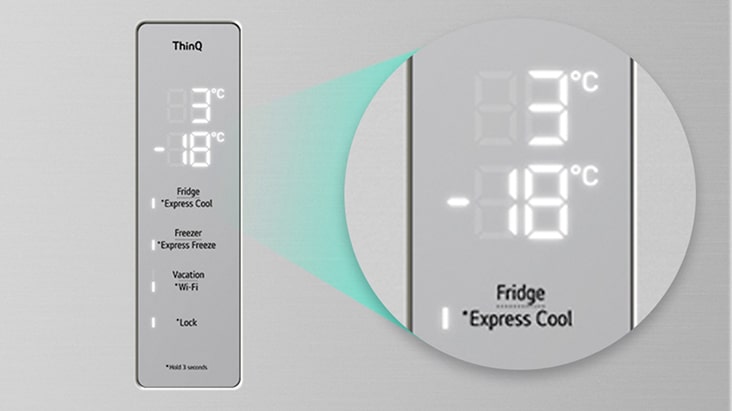
    Most LG refrigerators, whether you have a top freezer, bottom freezer, or French door model, are equipped with an easy-to-use digital control panel. Here’s a step-by-step guide to adjusting the temperature:

    1. Locate the control panel


    On most LG models, the temperature controls are found inside the refrigerator, on the right wall or above the top shelf. On newer models, the controls may be on the front door for easy access.  

    2. Check the current temperature


    The display will show the current temperature for the refrigerator and freezer. It’s a good idea to keep a thermometer inside to verify accuracy, especially if you suspect the temperatures are off.  

    3. Adjust the settings


    Use the up and down arrows or the “refrigerator” and “Freezer” buttons to set your desired temperature. Each press usually changes the setting by one degree. For example, to set your refrigerator to 3°C, press the “refrigerator” button until the display reads 3°C.  

    4. Wait for the temperature to stabilize


    Changes in settings won’t take effect immediately. It may take several hours, or even a full day, for the temperature to settle at the new setting.  

    For LG refrigerators with SmartThinQ or LG ThinQ app compatibility, you can adjust the temperature remotely from your smartphone. Simply open the app, select your appliance, and set the preferred temperature with a few taps. It’s a convenient way to make changes without opening the door.  

    Always refer to your user manual for specific instructions, as button layouts and digital displays can vary between models

    What Is the Ideal Temperature for the Refrigerator and Freezer?

    Interior of an LG refrigerator neatly stocked with fruits, vegetables, drinks, and desserts, showing how ideal temperature preserves freshness.

    Setting your refrigerator and freezer to the optimal temperature is essential for preserving food freshness, preventing spoilage, and ensuring the longevity of your groceries. Different types of food—like dairy products, meats, and vegetables—require specific storage conditions to maintain their quality.  

    Ideal Refrigerator Temperature


    For most homes, the recommended temperature for the refrigerator compartment is between 3°C and 5°C (approximately 37°F to 41°F). This range is ideal for ensuring the freshness and durability of your food while optimizing energy consumption


    At this temperature, bacteria growth is slowed significantly, keeping perishable items like milk, cheese, deli meats, and produce at their best for as long as possible. Storing food within this range also helps prevent freezing of sensitive items like leafy greens or eggs, which can be damaged if the refrigerator is set too cold.  

    Ideal Freezer Temperature


    The freezer should be set to -18°C (0°F). This temperature is crucial for halting the growth of microorganisms, microbes, and bacteria that can spoil your food or pose health risks. 


    At -18°C, food is safely preserved for extended periods, maintaining its nutrients, texture, and flavor. This is especially important for meats, seafood, and frozen vegetables. Setting the freezer warmer than this can lead to spoilage, while setting it colder wastes energy without providing additional benefits.  

    Factors That Can Affect Internal Temperature  


    Even if you set your LG refrigerator to the optimal temperature, several factors can cause fluctuations inside, leading to increased energy usage and higher electricity bills. Understanding these factors will help you keep your refrigerator running efficiently.

    Blue dial thermometer reading warm, showing how external factors can affect refrigerator’s internal temperature stability and food safety.

    · Door Opening Frequency


    Every time you open your refrigerator or freezer, warm air enters and the appliance must work harder to restore the set temperature. Frequently opening the door, or leaving it open for extended periods, makes the compressor run more often, resulting in significantly increased energy consumption.

    · Food Organization


    Overloading your refrigerator can block air vents and restrict the free circulation of cold air. When air can’t circulate freely, some areas may become too warm, leading to uneven cooling and higher electricity usage as the refrigerator works overtime.

    · Condition of the Door Seals


    The rubber gaskets or seals around your refrigerator and freezer doors are designed to keep cold air inside. If these seals are dirty, cracked, or damaged, cold air can escape, reducing the efficiency of your appliance and causing the compressor to run more frequently.  

    · Inadequate Temperature


    Setting your refrigerator or freezer to a temperature lower than necessary does not make food last longer. Instead, it forces the compressor motor to run more often, increasing energy consumption without improving food preservation. This not only drives up your bills but also shortens the appliance’s lifespan.

    · Refrigerator Location


    Where you place your refrigerator matters. If it’s near a heat source like an oven, radiator, or under direct sunlight, the external heat can raise the internal temperature. The appliance then compensates by using more energy to maintain the cool environment inside.  

    · Introduction of Hot Foods


    Placing hot or even warm foods directly into the refrigerator or freezer makes the internal temperature rise quickly. The refrigerator then works harder to cool both the new item and the surrounding air, consuming more energy in the process.

    Tips for Saving Energy by Adjusting the Refrigerator Temperature

    Keeping your refrigerator and freezer at the right temperature is one of the simplest and most effective ways to save energy in your home. Here are some practical tips to help you maintain those ideal settings and keep your food fresh for longer.

    ✓ Maintain the Ideal Temperature

    Always set your refrigerator between 3°C and 5°C and your freezer at -18°C. This is the sweet spot for food preservation and energy efficiency.


    ✓ Do Not Set the Temperature Too Low

    Stick to the optimal settings to save energy and prevent unnecessary wear on your appliance.


    ✓ Don’t Overload the Refrigerator

    For cold air to circulate effectively, there needs to be space between items. Avoid overpacking shelves or cramming in too much food.


    ✓ Defrost the Freezer Regularly

    A thick layer of ice reduces efficiency and forces your appliance to use more energy to keep things cold. When ice buildup reaches about 6mm (¼ inch), it’s time to defrost.


    ✓ Check the Door Seals

    Inspect the door gaskets regularly for cracks, tears, or debris. Clean them with mild soap and water, and replace them if they’re damaged. 


    ✓ Do Not Introduce Hot Foods

    Let hot leftovers or cooked meals cool down to room temperature before placing them in the refrigerator or freezer. 


    ✓ Keep the Door Closed

    Only open the refrigerator or freezer door when necessary, and close it as soon as possible. 


    ✓ Place the Refrigerator in a Suitable Location

    Position your refrigerator away from heat sources like ovens, radiators, and direct sunlight.

    Conclusion


    Adjusting your refrigerator and freezer to the right temperature isn’t just about food safety—it’s about maximizing freshness, minimizing waste, and saving energy every day. By following these tips and keeping your LG refrigerator at the optimal settings, you can enjoy delicious, healthy meals while keeping your energy bills under control. Remember, a few small adjustments in your daily routine make a big difference for your family, your budget, and the environment. 


    For more helpful tips or to learn about the latest LG refrigerators with advanced temperature control, visit our website or contact LG customer support. Enjoy fresher food and a greener home, starting today!

    FAQ

    Q.

    How long does it take for the temperature to adjust after changing the setting?

    A.

    It can take several hours, or up to 24 hours, for your refrigerator or freezer to stabilize at a new temperature. Avoid making frequent adjustments, as this can confuse the thermostat and lead to uneven cooling.

    Q.

    How do I know if my refrigerator is too warm or too cold?

    A.

    Use a refrigerator thermometer to check the actual temperature. If food is spoiling quickly or freezing unexpectedly, the temperature may be off. Adjust as needed, and check again after a few hours.

    Q.

    What should I do if the temperature won’t stay consistent?

    A.

    Check the door seals, ensure the vents aren’t blocked, and avoid overloading the fridge. If problems persist, contact LG customer service for assistance.

    Q.

    Can I adjust the temperature remotely on my LG refrigerator?

    A.

    Yes, many LG refrigerators with LG ThinQ™ technology allow you to adjust the temperature remotely using your smartphone. Check your model’s manual for compatibility and instructions.