LG UltraWide Monitor logo.

LG UltraWide Monitor logo.

29-inch 21:9 WFHD (2560x1080) IPS Display

A modern home office setup featuring a large ultra-wide LG monitor displaying data dashboards and graphs, with a wireless keyboard and mouse on a wooden desk.
Ultra-wide 29-inch LG monitor illustrating the difference between 21:9 and 16:9 aspect ratios, with multiple applications displayed side by side for multitasking.

29" WFHD
IPS™ Display

with 3-side Narrow Bezel Design

Night view of a brightly lit modern bridge and skyscrapers with vivid lighting reflected in the water, demonstrating high contrast and color detail.

HDR10
Detailed
contrast

A USB Type-C cable connected between a laptop and an ultra-wide LG monitor displaying a video editing interface, with a close-up showing the USB-C port on the monitor.

USB Type-C™  with versatile connectivity

A futuristic motorcyclist racing through a neon-lit cityscape, with a highlighted section showing a clearer, sharper view to demonstrate motion clarity.

Clear and smooth with 100Hz refresh rate

Side view of a white monitor illustrating tilt adjustment with overlapping outlines showing its ergonomic movement range.

Clutter-minimising Sleek Stand

21:9 UltraWide™ Full HD Display

See more, do more

The UltraWide™ Full HD (2560×1080) display provides more horizontal screen space than a standard FHD (1920×1080) monitor. The 3-side narrow bezel design offers an uninterrupted, wider view. This allows for more efficient multitasking without switching between windows.

Ultra-wide 29-inch LG monitor illustrating the difference between 21:9 and 16:9 aspect ratios, with multiple applications displayed side by side for multitasking.

Images simulated to enhance feature understanding. It may differ from actual use.

HDR 10

Detailed contrast

HDR technology is now widely used across various types of content. This monitor supports the industry-standard HDR10 high dynamic range and covers 99% of the sRGB colour gamut, delivering precise levels of colour and brightness that allow viewers to fully experience the vivid and dramatic visuals of HDR content.

LG ultra-wide monitor displaying a vivid nighttime cityscape with a brightly lit bridge and reflection, shown within a photo editing software interface highlighting colour and contrast tools.

Images simulated to enhance feature understanding. It may differ from actual use.

USB Type-C™ (DisplayPort Alt mode)

USB Type-C™ with versatile connectivity

This monitor offers USB Type-C™, DisplayPort, HDMI ports to ensure smooth connectivity with various devices. The USB Type-C™ port supports both display output and data transfer, allowing easy connection to your laptop with a single cable.

A USB Type-C cable connecting a laptop to an LG ultra-wide monitor, with a close-up showing the USB-C port on the back of the monitor and a video editing program running on both screens.

Images simulated to enhance feature understanding. It may differ from actual use.

To work properly, the USB Type-C™ cable is required and must be purchased separately.

Waves MaxxAudio®

Immersive Sound System

Two 5W Stereo Speakers with MaxxAudio® completes your immersive experience.

LG ultra-wide monitor displaying a video conference with six participants and a financial dashboard, with sound waves and speaker icons indicating built-in audio capabilities.

Images are simulated to enhance feature understanding and may differ from actual use.

LG Switch app

Switch swiftly

You can readily divide the whole display into up to 6 sections, change the theme design, or even launch a video call platform with a mapped hotkey. It also supports PBP and PIP modes for efficient multitasking across multiple input sources.

Images are simulated to enhance feature understanding and may differ from actual use.

To download the latest LG Switch app, search for 29U531A in the LG.com Support Menu.

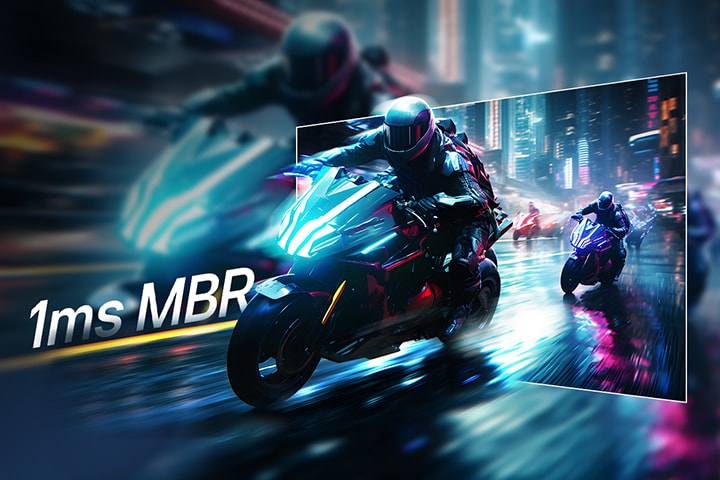
1ms MBR

Clear motion with 1ms MBR

1ms MBR reduces motion blur and ghosting, delivering smooth gameplay and clear visuals in fast-paced scenes.

Futuristic motorcyclists racing through a neon-lit city street, with motion blur effect in the background and a highlighted section showing sharp, clear visuals to demonstrate 1ms Motion Blur Reduction (MBR).

Images simulated to enhance feature understanding. It may differ from actual use.

1ms Motion Blur Reduction causes lowered luminance, and the following feature cannot be used while it is activated : AMD FreeSync™.

Flicker may occur during 1ms MBR operation.

Built for comfort, designed for productivity

Reader Mode

Adjusts colour temperature and brightness to help reduce eye fatigue when viewing documents for extended periods.

Flicker Safe

Flicker Safe reduces invisible flickering on the screen and provides a more comfortable working environment for your eyes.

Images simulated to enhance feature understanding. It may differ from actual use.

Performance of the above feature may vary and is dependent on real use conditions.

Sleek Stand with a Slim Base

Reduce clutter with a sleek design

Designed for productivity and style, the 3-side narrow bezel screen and space-saving L-stand create a clean, clutter-minimising workspace. This monitor is built to enhance comfort and focus - ideal for long editing sessions and precise visual work.

Top and angled views of an monitor setup on a clean desk, featuring a coffee cup, wireless keyboard, mouse, and a sleek, low-profile stand that ensures stability and saves space.

What people are saying

Our picks for you

Need help?

We're here to provide all the help you need.

    Contact us