• Enter ZIP for Estimated Delivery
Add to Wishlist

KEY FEATURES

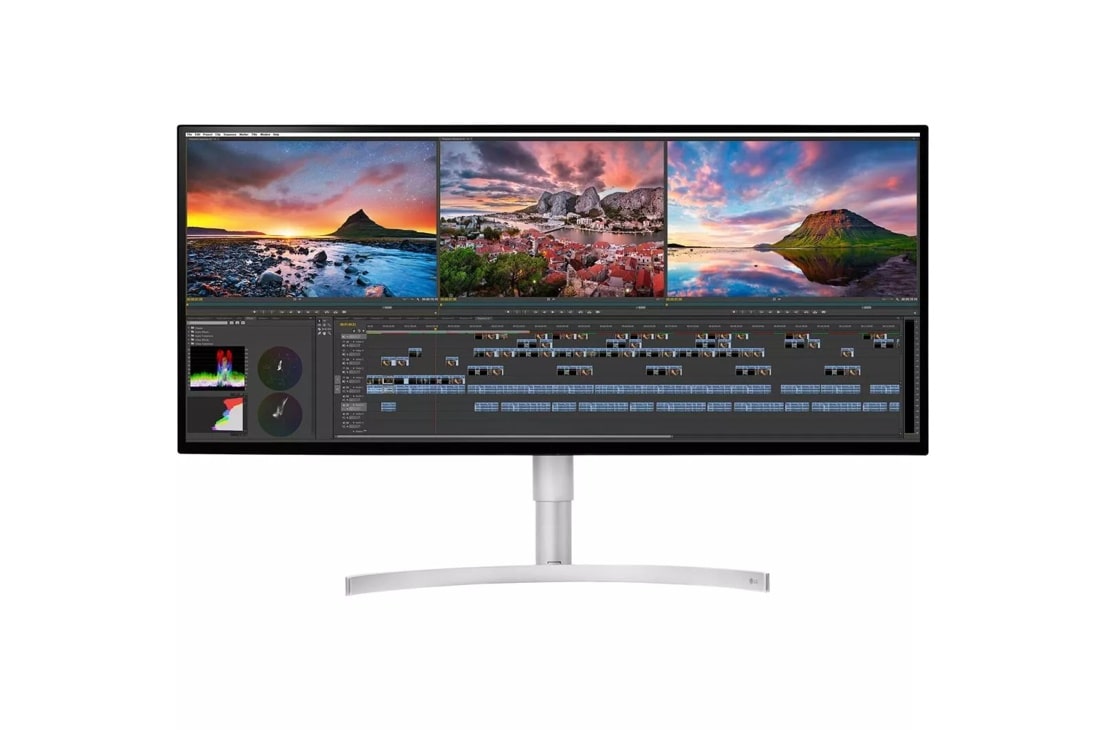
  • 34" UltraWide® Nano IPS Display
  • 5K2K WUHD (5120 x 2160) Resolution
  • Thunderbolt™ 3
  • DCI-P3 98%
  • HDR Support
  • 4-Side Virtually Borderless Design
34" Class 21:9 UltraWide® 5K2K Nano IPS LED Monitor with HDR 600 (34" Diagonal)
$ 1,499.99
The Verge Best Monitor mark

The Verge Awards at CES 2018 – Best Monitor

The Verge Awards at CES recognize the pieces of technology that will shape 2018, and beyond.
Digital Trends mark
"You want a display that's a little extra". 1/9/2018
See for yourself why experts love this spacious monitor.
  • Screen Space

    5K2K
    21:9 UltraWide™

  • HDR

    VESA CERTIFIED
    DisplayHDR™ 600

  • Color

    Nano IPS 98%
    DCI-P3

UL VERIFIED, verify.UL.com, B783608 mark
LG 34WK95U is UL verified for 'Nano IPS covers DCI-P3 color Gamut which is 35%(Typical) large than sRGB 100%
*Thunderbolt™ 3 on Earlier windows PCs
Your Thunderbolt™ 3 device is certified for windows PC before July 2016 make certain your PC has the most recent versions of the items listed below.
- BIOS/Thnderbolt™ 3 driver/Thunderbolt™ 3 Firmware (if available)
Contact your PC manufacturer to confirm your system is up to date. You may also review the following website for additional information.
https://thunderbolttechnology.net/updates

PICTURE QUALITY

    • Resolution
    • 5120 x 2160
    • Display Type
    • Nano IPS
    • Aspect Ratio
    • 21:9
    • Brightness
    • 450 (Typ), 360 (min) cd/m2
    • Color Gamut (Type):
    • DCI-P3 98% (CIE1976)
    • Response Time
    • 5ms
    • Contrast Ratio (DFC)
    • 1200:1 (Typ)
    • Viewing Angle
    • 178/178 (CR≥10)

SPECIAL FEATURES

    • Key Lock
    • Yes
    • DDC/CI
    • Yes
    • HDCP
    • Yes (2.2)
    • Picture Mode
    • (Non HDR Contents) Custom/Vivid/Reader/Cinema/HDR Effect/sRGB/DCI-P3 REC2020/EBU/REC709/SMPTE-C/Color Weakness (HDR 10) HDR Vivid, HDR Cinema , HDR Game, HDR Standard
    • Super Resolution+
    • Yes
    • Factory Calibration
    • Yes
    • Automatic Standby
    • Yes
    • Reader Mode
    • Yes
    • Six Axis Control
    • Yes
    • DAS Mode
    • Yes
    • Auto Brightness
    • Yes
    • Response Time Control
    • Yes
    • OnScreen Control (OSC)
    • Yes
    • My Display Preset (in OSC)
    • Yes
    • Dual EDID (H/W)
    • Yes
    • Ratio
    • Full Wide, Original, Cinema1, Cinema2, Just scan
    • Local Dimming
    • Yes
    • H/W Calibration (True Color Pro)
    • Yes
    • Screen split2.0 (in OSC)
    • Yes
    • HDR (High Dynamic Range)
    • VESA HDR 600
    • Smart Energy Saving
    • Yes

INPUT/OUTPUT

    • HDMI
    • Yes x 2
    • DisplayPort
    • Yes
    • Headphone Out
    • Yes
    • USB Up-stream
    • Yes x 1 (v3.0)
    • USB Down-stream
    • Yes x 2 (v3.0)

POWER

    • Type
    • Built-in Power
    • Normal On (EPA)
    • 54.78W
    • Normal On (factory out condition Typ.)
    • 80W
    • Output
    • 85W
    • DC Off (Max)
    • Less than 0.3W

STANDARD

    • TUV-Type
    • Yes
    • UL(cUL)
    • Yes
    • FCC-B, CE
    • Yes
    • Windows 10
    • Yes
    • TCO 6.0
    • Yes
    • ErP
    • Yes
    • DisplayPort:
    • Yes
    • CCC (for China)
    • Yes
    • BSMI (for Taiwan)
    • Yes

DIMENSIONS/WEIGHTS

    • Shipping Weight
    • 25.8 lbs
    • With Stand (WxHxD)
    • 32.2" x 22.0" (Up)/17.7" (Down) x 9.2"
    • Without Stand (WxHxD)
    • 32.16" x 14.2" x 2.2"
    • Shipping Dimensions (WxHxD)
    • 37.5" x 20.4" x 7.1"
    • With Stand Weight
    • 19.4 lbs
    • Without Stand Weight
    • 16.5 lbs

STAND

    • Tilt (Angle)
    • -5~15 Degree
    • One Click Stand Set-up
    • Yes
    • Height (mm)
    • 110mm
    • VESA
    • Yes
    • Wall mount size (mm)
    • 100 x 100 mm

CABINET/ACCESSORIES

    • Power Cord
    • Yes
    • Display Port
    • Yes
    • Cable Holder
    • Yes
    • Thunderbolt3 Cable
    • Yes
    • USB (USB B-to-A, White)
    • Yes

WARRANTY/UPC

    • Limited Warranty
    • 1 Year Parts and Labor
    • UPC
    • 719192617384

What people are saying

Rated 2 out of 5 by from Great Idea/Great Product - At FIRST I've had this monitor for a while now. However, I have been dealing with image retention (burn in) since almost the first month of ownership. I have many LG products in my home but this was truly disappointing given the high cost of ownership.
Date published: 2022-11-29
Rated 5 out of 5 by from Best monitor ever …and I’ve had a few. Including the ultra fine 5k from LG
Date published: 2022-11-19
Rated 2 out of 5 by from Easily broken. I had this just over the warranty period where I got a slight hit on the side. That was enough to crack the screen under the outside screen. Very disappointed. Next time get extended warranty.
Date published: 2022-09-03
  • y_2023, m_4, d_6, h_23
  • bvseo_bulk, prod_bvrr, vn_bulk_3.0.35
  • cp_1, bvpage1
  • co_hasreviews, tv_0, tr_87
  • loc_en_US, sid_MD05913936, prod, sort_[SortEntry(order=SUBMISSION_TIME, direction=DESCENDING)]
  • clientName_lg
  • bvseo_sdk, java_sdk, bvseo-4.0.0
  • CLOUD, getReviews, 4ms
  • REVIEWS, PRODUCT

BUY DIRECTLY FROM LG

34WK95U-W
$1,499.99
In Stock
Sold and Fulfilled by LG
  • Free Shipping*
  • FREE Shipping

ASK & ANSWER

Ask your questions. Share your answers.
Please review the detailed product information and help guides in the
Product Support section for this product prior to posting a question.

I have two of these monitors. If i wanted to Daisy Chain them, do I connect them via Display Port and then run a USB-C(Thunderbolt) to my Macbook Pro 2021?

Asked by: E_bach
Hello E-Bach. The LG 34'' Class 21:9 UltraWide® 5K2K Nano IPS LED Monitor with HDR 600 (34'' Diagonal), Model # 34WK95U-W does not support daisy chaining. The only port on the monitor that supports daisy chaining is the DisplayPort, but the DisplayPort on the monitor is an input. To daisy chain monitors, you would need both a DisplayPort Input and a DisplayPort Output...^Ivan
Answered by: Ivan4826
Date published: 2023-02-16

I bought this monitor but I can't get it works with resolution 5k 2k(5120x2160) with my Mac mini M1. I need  how to solve this problem.

Asked by: ROBBINFP
Have you checked the specifications for the graphics card in your Mac Mini M1 to see what refresh rates and resolutions it supports and what connectivity it has? Which ports are you using to connect the monitor to your Mac Mini M1? As indicated in its title, the LG 34'' Class 21:9 UltraWide® 5K2K Nano IPS LED Monitor with HDR 600 (34'' Diagonal), Model # 34WK95U-W has a native resolution of 5120 x 2160. Connectivity for the monitor includes 2 x HDMI ports, 2 x USB Down-Stream (ver 3.0), a USB Up-Stream (ver 3.0) port, a Thunderbolt ™ 3 port that supports USB-C, a DisplayPort, and a 3.5 mm Headphone Out port. The monitor supports a maximum resolution of 3840 x 2160 @ 60Hz over HDMI and it supports a maximum resolution of 5120 x 2160 @ 60Hz over USB-C, DisplayPort, and Thunderbolt™ 3...^Ivan
Answered by: Ivanf
Date published: 2023-01-20

No Audio on LG’s speaker via USB-C to Macbook Pro 2016. I have the audio on LG after I restart my macbook, but the audio would disappear every time my macbook hibernate. This issue only happen when they’re connected via usb-C, not via DP. Any suggestion?

Asked by: sw1wc
I have similar issue with win10 on dell notebook 7320, connected LG5K2K with USB-C cable, most of times when I turn on the notebook, I can't find USB audio device within the audio output device but few times it will display in the list, I even ask customer service to replace main board but not help. I also tried to connect one HP dock b/w notebook and LG5K2K and I find the USB audio device will always recognized by Dell7320, so I don't think this caused by win10 and should some issue in LG firmware.
Answered by: Anonymous
Date published: 2021-06-30

I have a MacBook Pro (15-inch, 2017) I want to use the monitor with my MacBook. Is it compatible because I've heard from other people that bought it and they have issues? Is the burn-in a big issue on this screen too?

Asked by: d1988f
We are not aware of any burn-in issues with the LG 34'' Class 21:9 UltraWide® 5K2K Nano IPS LED Monitor with HDR 600 (34'' Diagonal), Model # 34WK95U-W. As the title indicates, this monitor is an LED LCD monitor, and although burn-in and image retention are possible on virtually any display, it is very rare to hear of burn-in or image retention on an LED LCD monitor. The only issue that we are aware of with regards to compatibility with MacBook Pro was with the MacBook Pro (15-inch 2018) connecting through ThunderBolt 3 but that issue was resolved when the next version of macOS was released in 2018. There were no compatibility issues that were reported for the MacBook Pro (15-inch, 2017) or any other MacBook Pro that we are aware of...^IFV
Answered by: Ivanf
Date published: 2021-08-14

With the port selection available on the monitor - how would I be able to or will I be able to get the native resolution (5120 x 2160) with HDR support at 60Hz? - Is the DP 1.4 / HDMI 2.0 able to support such bandwidths? Which do I use & is it supported?

Asked by: TechGuyDJ
The HDMI ports on the LG 34'' Class 21:9 UltraWide® 5K2K Nano IPS LED Monitor with HDR 600 (34'' Diagonal), Model # 34WK95U-W support a maximum resolution of 3840 x 2160 @ 60Hz with an 8-bit or 10-bit Color Depth and Chroma Samplings of YCbCr 4:2:0 and YCbCr 4:2:2 and a Chroma Sampling of YCbCr or RGB 4:4:4 for an 8-bit Color Depth with HDMI Ultra HD Deep Color set to On. The USB-C and DisplayPort both support a maximum resolution of 5120 x 2160 @ 60Hz. THe DisplayPort must be set for DP 1.4 and it must be set for DP 1.4 for HDR...^IFV
Answered by: Ivanf
Date published: 2022-11-24

How do you get MBP to connect at 144hz refresh rate? My MBP 2016. with Radeon Pro 460 is only getting 75hz.

Asked by: jpmoran
The LG 34'' Class 21:9 UltraWide® 5K2K Nano IPS LED Monitor with HDR 600 (34'' Diagonal), Model # 34WK95U-W does not support 144Hz which is why it is not appearing as an option for your Radeon Pro 460 Graphics card...^IFV
Answered by: Ivanf
Date published: 2020-12-02

Will this monitor work with the newest Macbook pro 16" (2019 fully speced out)? Have there been any reported problems like the previous Macbook pros? I want to use the thunderbolt 3 to connect.

Asked by: JPM2
I've been using this without issue with my 16" MBP for months. Works beautifully.
Answered by: APlusPhysics
Date published: 2020-10-05

This came up when looking for a curved monitor. Is this curved or is there a curved version of the same? It seems ridiculous to have this monitor as flat.

Asked by: Verity
The LG 34'' Class 21:9 UltraWide® 5K2K Nano IPS LED Monitor with HDR 600 (34'' Diagonal), Model # 34WK95U-W is not a curved screen. The version of this monitor with a curved screen is the 34" Class Curved 21:9 UltraWide® QHD (3440 x 1440) Nano IPS Monitor (34" Diagonal), Model # 34WK95C-W as indicated by the "C" in its model number. Other 34" LG monitors with a curved screen are Model # 34GN850-B, Model # 34GL750-B, Model # 34UC89G-B, Model # 34UC79G-B, Model # 34GK950F-B, Model # 34WL85C-B, Model # 34UC88-B, Model # 34UC80-B, Model # 34UC98-W, Model # 34GK950G-B, Model # 34WN80C-B, Model # 34WL75C-B, and with a 38" screen is, Model # 38WK95C-W, Model # 38UC99-W, Model # 38WN95C-W, and Model # 38WN75C-B...^IFV
Answered by: Ivanf
Date published: 2022-03-26
  • y_2023, m_4, d_5, h_20CST
  • bvseo_bulk, prod_bvqa, vn_bulk_3.0.35
  • cp_1, bvpage1
  • co_hasquestionsanswers, tq_131
  • loc_en_US, sid_MD05913936, prod, sort_[SortEntry(order=LAST_APPROVED_ANSWER_SUBMISSION_TIME, direction=DESCENDING)]
  • clientName_lg
  • bvseo_sdk, java_sdk, bvseo-4.0.0
  • CLOUD, getContent, 3ms
  • QUESTIONS, PRODUCT

Compare (0)