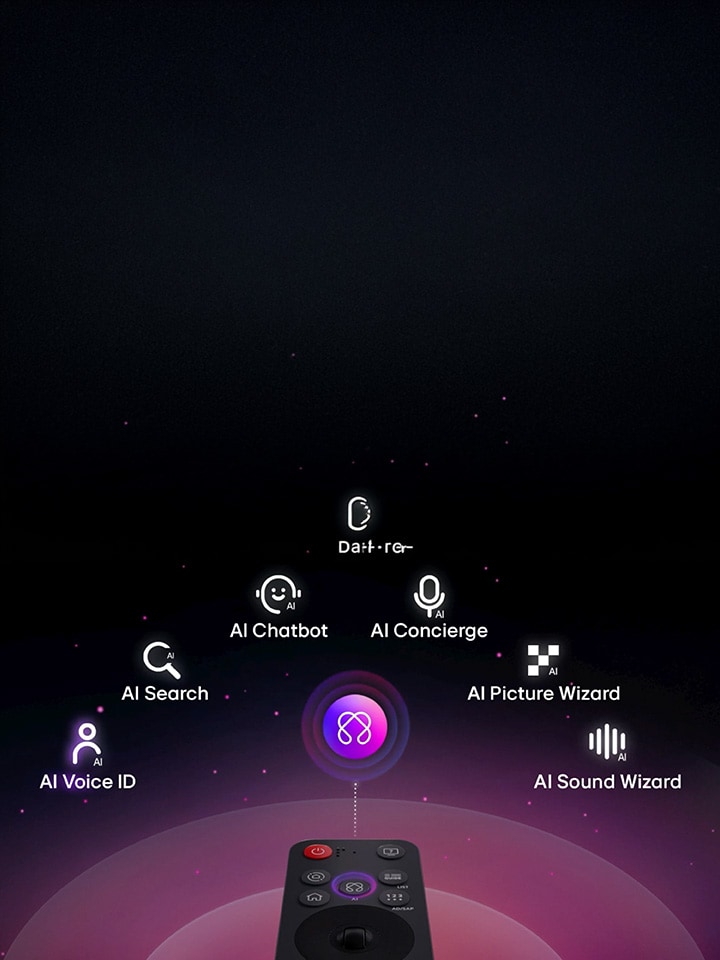
AI Magic Remote enhances your way of controlling the TV


The LG AI Magic Remote has smart and more convenient ways to interact with your LG TV. With a motion sensor, scroll wheel, and voice control, it makes navigating menus, searching for content, and accessing AI features more intuitive.

What is the AI Magic Remote and how does it work?


The AI Magic Remote is an advanced remote designed to simplify controlling compatible LG TVs. It has a motion sensor and scroll wheel that lets you point and click on the screen like an air mouse, making it easy to navigate menus and select content. You can use the microphone button to give voice commands, which allows you to interact with your TV more naturally.

The remote also works with many AI experiences available on compatible LG TVs, including AI Voice ID, AI Search, AI Concierge and AI Chatbot. Availability of some features may vary depending on the TV model, region, supported language and internet connection.

What sets the AI Magic Remote apart from other remotes?


Unlike conventional remotes that depend on button-based navigation, the AI Magic Remote provides point-and-click control for a more intuitive experience. Its motion sensor lets you move the on-screen pointer naturally, while the scroll wheel makes navigation menus and content easier.

The dedicated AI button also provides quick access to compatible AI features. With AI Search, you can use voice commands to look for recommendations, while AI Concierge can provide customized keywords and recommendations as per search and viewing history. The AI Chatbot can also help with settings and troubleshooting on compatible TVs.

How to use the smart features of the AI Magic Remote?


Using the AI Magic Remote is simple. Point it towards the TV to move the on-screen pointer, use the scroll wheel to navigate, or press the microphone button to give voice commands.

Key features include:

  1. Point-and-click navigation: Move the pointer around the screen using the remote's motion sensor.
  2. Scroll wheel: Scroll through menus and content with ease.
  3. Voice commands: Use the microphone button to interact with compatible AI features through voice.
  4. AI Search: Search for content and receive relevant recommendations using voice commands.
  5. AI Concierge: Access customised keywords and recommendations based on your search and viewing history.
  6. AI Chatbot: Use voice interaction to get help with TV settings and troubleshooting.
  7. AI Picture Wizard: Personalise the picture experience based on your preferences.
  8. AI Sound Wizard: Create a more personalised sound experience based on your preferred audio characteristics.

Pro-tips to get the most out of your AI Magic Remote


To make the most of your AI Magic Remote, use the point-and-click function for quick navigation rather than depending only on traditional buttons. Try voice commands while searching for content or accessing compatible AI features.

You can also explore AI Concierge for personalised recommendations and use AI Chatbot to help with compatible TV settings. Keep the TV connected to the internet when needed, as some AI features depend on it. Feature availability may vary by model, region and supported language.

Regular maintenance and care tips for the AI Magic Remote


Proper care can help keep your AI Magic Remote work smoothly. Clean the remote with a soft, dry cloth and keep it away from liquids. Replace the batteries when the remote becomes slow or stops responding properly.

Avoid dropping or exposing it to extreme conditions. When not in use, keep it safely to avoid any accidental damage. For model-specific information, refer to the user manual provided with your compatible LG TV.

How to troubleshoot common problems with the AI Magic Remote?


If your AI Magic Remote does not respond or connect with your TV, check the batteries and replace them if necessary.

To pair the Magic Remote with a compatible LG TV, insert the batteries and turn on the TV. Point the remote towards the TV and press the Wheel (OK) button. If the remote does not register, LG recommends turning off the TV and back on before trying the pairing process again.

If voice commands are not working, check whether your TV model and language support the relevant voice recognition feature and whether an internet connection is needed. Some LG India TV models may have the AI Magic Remote available separately, while certain AI features are accessible only with a compatible remote.

*AI Magic Remote design, availability, and features may vary by region and language support, even for the same model.

*Some features may require an Internet connection.

*AI Voice Recognition can only be offered in countries that support NLP in your native language.

FAQs


A. The LG AI Magic Remote is a smart remote that makes controlling compatible LG TVs easier through motion-based point-and-click navigation, a scroll wheel, and voice commands. It also provides access to compatible AI features available on supported LG TVs.

A. Insert the batteries into the remote and switch on your TV. Point the AI Magic Remote towards the TV and press the Wheel (OK) button to register it. If registration does not work, turn the TV off and on, and repeat the process.

A. The AI Magic Remote combines point-and-click navigation, a scroll wheel and voice commands to make TV control more intuitive. It also provides access to AI features such as AI Search, AI Concierge and AI Chatbot on compatible LG TVs.

A. The available functions depend on the compatible LG TV model and supported features. The AI Magic Remote is primarily designed to control compatible LG TVs and access their supported AI experiences. Certain features may require an internet connection.

A. First, check or replace the batteries. If the remote does not register with the TV, turn the TV off and on, and press the Wheel (OK) button while pointing the remote at the TV to pair it. If the issue continues, refer to the TV's user manual or contact LG support.