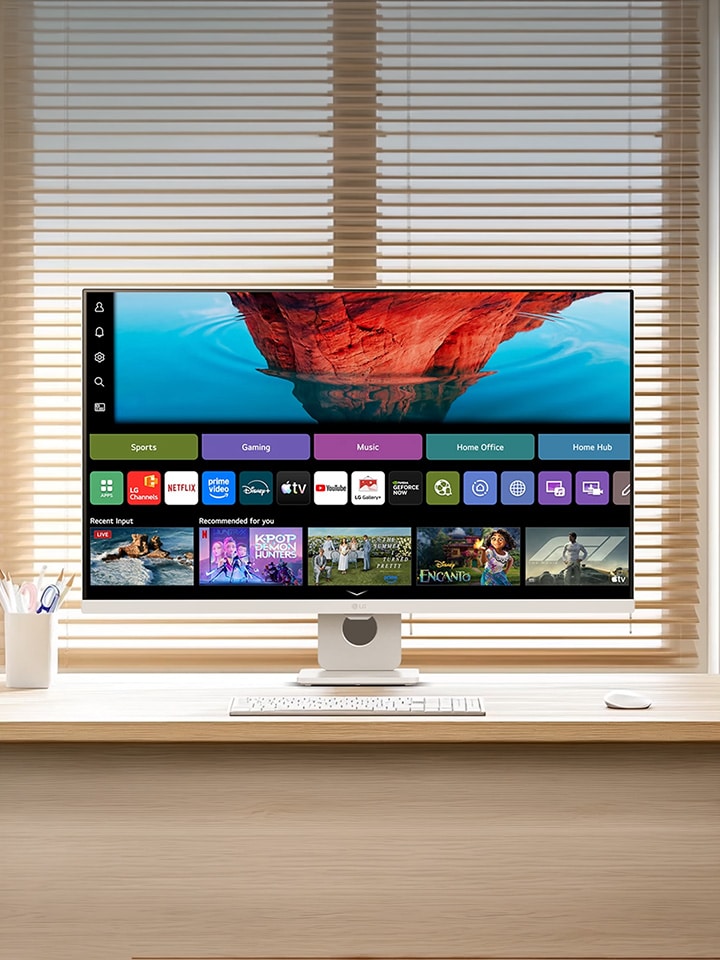
Modern monitors are evolving beyond displaying content from connected computers. Modern users want displays that support productivity, streaming, entertainment, and connectivity. A Smart Monitor combines standard monitor functionality with a built-in operating system, internet connectivity, and supported apps. It works as a computer display and also provides standalone entertainment. This guide covers how Smart Monitors work, their key features, benefits, practical uses, and differences from regular monitors and Smart TVs.

What Is a Smart Monitor and How Does It Work?


A Smart Monitor display combines traditional computer-monitor functionality with built-in smart features. It offers:

  1. Display connectivity for computers and external devices.
  2. Built-in operating systems and smart interfaces.
  3. Wi-Fi connectivity to access online services.
  4. Support for streaming and entertainment applications.
  5. Wireless screen sharing from compatible devices.

Some models can access smart applications without any connected PC or laptop. However, features vary by manufacturer, operating system, and model.

What Are the Key Features of a Smart Monitor?


Smart Monitors combine standard display capabilities with built-in technologies that improve everyday productivity, entertainment, and connectivity, providing convenient access to applications and connected devices through a single display.

  1. Built-in Operating System and Smart Interface

    A built-in operating system provides access to applications, settings, and menus. LG Smart Monitors feature webOS on supported models to navigate smart services.

  2. Built-in Streaming and Entertainment Applications

    Supported applications provide access to television shows, movies, and online videos. Netflix and YouTube-type streaming services are available on compatible models, subject to regional availability.

  3. Wi-Fi and Internet Connectivity

    Wi-Fi helps to access online services, streaming applications, and other supported smart features, allowing independent use.

  4. Screen Sharing and Wireless Connectivity

    Technologies such as AirPlay 2 and ScreenShare, where supported, allow users to mirror compatible smartphones, tablets, and laptops on a larger display.

  5. Built-in Speakers and Audio Features

    Integrated speakers provide audio for videos, online meetings, and everyday entertainment without separate speakers for basic listening.

  6. Multiple Connectivity Options

    HDMI, USB, and USB-C ports let you connect laptops, gaming consoles, and other devices. USB-C Power Delivery on supported models also provides laptop charging.

What Are the Benefits of Using a Smart Monitor?


A Smart Monitor offers flexibility beyond conventional display use, letting users manage work, entertainment, and connectivity through a single device. Its multifunctional capabilities make daily activities more convenient.

  1. Use It Without a PC or Laptop

    Access supported streaming applications, online services, and built-in smart functions through the monitor without a computer connection. It is convenient for everyday entertainment and browsing.

  2. One Display for Work and Entertainment

    Switch between computer-based tasks and standalone entertainment on the same screen. Connect a laptop for work, then use the monitor's built-in smart features to watch movies or online videos.

  3. Convenient Streaming and Online Access

    Built-in streaming applications provide direct access to supported entertainment services. Users can watch their preferred content without relying on extra streaming devices or connecting a laptop.

  4. Wireless Screen Sharing

    Share photos, videos, presentations, and other content from compatible smartphones and tablets on a larger display. This makes viewing and sharing content more convenient.

  5. Better Use of Space

    A Smart Monitor serves multiple purposes in bedrooms, study rooms, compact apartments, and home offices. It eliminates the need for a separate display for computer-related activities and entertainment.

  6. Flexible Connectivity

    Connect laptops, gaming consoles, and other external devices through available HDMI, USB, and USB-C ports. Supported wireless technologies also provide additional connectivity options for compatible devices.

What Can You Do with a Smart Monitor?


A Smart Monitor supports various everyday activities, from professional tasks and online learning to streaming and entertainment. Its multifunctional capabilities make it suitable for different users and living spaces.

  1. For Work From Home and Productivity

    Connect laptops, access supported productivity services, and use a larger display to multitask. USB-C connectivity simplifies connections and charging on compatible models.

  2. For Students and Online Learning

    Attend online classes, access learning applications, view study material, and share content through compatible devices.

  3. For Movies, OTT and Entertainment

    Watch movies and online videos through supported streaming applications. Built-in speakers and wireless connectivity add convenience.

  4. For Bedrooms and Compact Living Spaces

    Use one display for entertainment, browsing, and computer-related activities. Consider screen size, placement, and viewing distance before choosing a model.

Smart Monitor vs Regular Monitor: What Is the Difference?


Although both Smart Monitors and regular monitors support computer connectivity, they differ in their built-in capabilities and everyday functionality. The following table highlights their key differences.

Feature Smart Monitor Regular Monitor
Built-in operating system Available on supported models Generally unavailable
Streaming applications Available on supported models Requires an external device
Wi-Fi connectivity Available on supported models Generally uncommon
Standalone entertainment Supported on compatible models Requires a connected device
Computer connectivity Supported Supported
Wireless screen sharing Available on supported models Model-dependent
Built-in speakers Model-dependent Model-dependent

A regular monitor suits users who primarily need a display for computer-based tasks. A Smart Monitor is for those who want additional smart functionality, streaming, and standalone entertainment with regular monitor use.

Smart Monitor vs Smart TV: Which One Should You Choose?


Both devices support connected entertainment, but their primary purposes differ.

  1. Primary usage: Smart Monitors suit workspaces and study areas, while Smart TVs focus on home entertainment.
  2. Screen size: Smart Monitors are designed for desktop viewing, whereas Smart TVs accommodate different room sizes.
  3. Ergonomics: Monitors support desk-based positioning and computer usage.
  4. Connectivity: Smart Monitors focus on computer connections and productivity.
  5. Entertainment: Both offer supported streaming applications.
  6. Audio and display: Compare their picture and sound capabilities according to your needs.

A Smart Monitor is a practical choice for study rooms and home offices when users use the display for computer-based tasks, online learning, and occasional entertainment. It has a desktop-friendly design and connectivity features that support everyday productivity. On the other hand, a dedicated Smart TV is appropriate for shared family viewing and offers an entertainment-focused experience to watch movies, shows, and other content. The choice depends on your viewing habits, available space, and primary usage.

What Should You Consider Before Buying a Smart Monitor?


Below is the checklist to help you make a purchase:

  1. Screen Size and Available Desk Space: Choose a size that suits your workspace and viewing distance.
  2. Display Resolution and Picture Quality: Consider Full HD for everyday use and 4K for higher-resolution viewing.
  3. Operating System and Supported Applications: Check application availability and software support in your region.
  4. Connectivity and Compatibility: Review HDMI, USB, USB-C, Wi-Fi, AirPlay, and screen-sharing support.
  5. Audio and Built-in Speakers: Check integrated audio capabilities and whether external speakers are needed.
  6. Intended Usage and Budget: Prioritise features according to your work, learning, and entertainment needs.

How Do LG Smart Monitors Make Everyday Usage More Convenient?


LG Smart Monitors combine display capabilities with smart technologies to support productivity, entertainment, and wireless connectivity. Depending on the model, their key features include:

  1. webOS: Provides access to a built-in smart interface and supported applications.
  2. Streaming Applications: Allows users to watch movies, shows, and online videos through compatible streaming services.
  3. LG Channels: Offers access to free entertainment channels where available.
  4. AirPlay 2 and ScreenShare: Enables wireless screen sharing from compatible Apple, Android, and Windows devices.
  5. LG ThinQ Integration: Allows users to access supported smart device controls and monitor settings through the ThinQ app.
  6. Connectivity Options: HDMI, USB, and USB-C ports on supported models connect laptops and other external devices. Selected models also support USB-C Power Delivery.

These features make LG Smart Monitors suitable for home entertainment, everyday productivity, and convenient device connectivity. Explore options like the LG 68.58 cm (27) Smart Monitor and LG 80 cm (32) Smart Monitor to compare available specifications.

Explore LG Monitor Models and Their Key Specifications


LG has monitors in different screen sizes, resolutions and panel types to suit different workspace and viewing requirements. Compare the following models based on their display specifications, refresh rates, and connectivity options to find the one that matches your needs.

Model Number Size & Colour Panel Type Resolution Max Refresh Rate Standout Features / Ports
24U511SB-B 60.96 cm (24), Black IPS 1080p FHD 120Hz Compact desk footprint, 2x HDMI, 2x USB-A
32U701SB-B 80.01 cm (31.5), Black VA 4K UHD 60Hz 3000:1 native contrast ratio, 2x HDMI, 1x USB-A
27U731SB-W 68.58 cm (27), White IPS 4K UHD 60Hz USB-C with 65W Power Delivery, 2x HDMI, 2x USB-A
32U721SB-W 80.01 cm (31.5), White VA / IPS* 4K UHD 60Hz USB-C with 65W Power Delivery, 2x HDMI, 2x USB-A
32U501SB-B 81.28 cm (32), Black VA / IPS* 1080p FHD 120Hz Large display, 2x HDMI, 2x USB-A

Is a Smart Monitor the Right Choice for You?

A Smart Monitor combines traditional display functionality, smart applications, and connectivity to support work, learning, and entertainment. The right choice depends on usage, preferred screen size, display requirements, and connectivity. Explore LG Smart Monitors on the website to compare models and find one that suits your everyday requirements.

FAQs


A. A Smart Monitor combines traditional display functionality with a built-in operating system, Wi-Fi, and supported applications.

A. Yes, compatible models access built-in applications and smart functions independently.

A. A Smart Monitor offers built-in smart features, while a regular monitor usually needs external entertainment devices.

A. No, Smart Monitors focus on desktop productivity alongside entertainment, while Smart TVs primarily support home viewing.

A. Yes, connect a laptop, multitask on a bigger display, and access supported productivity services.