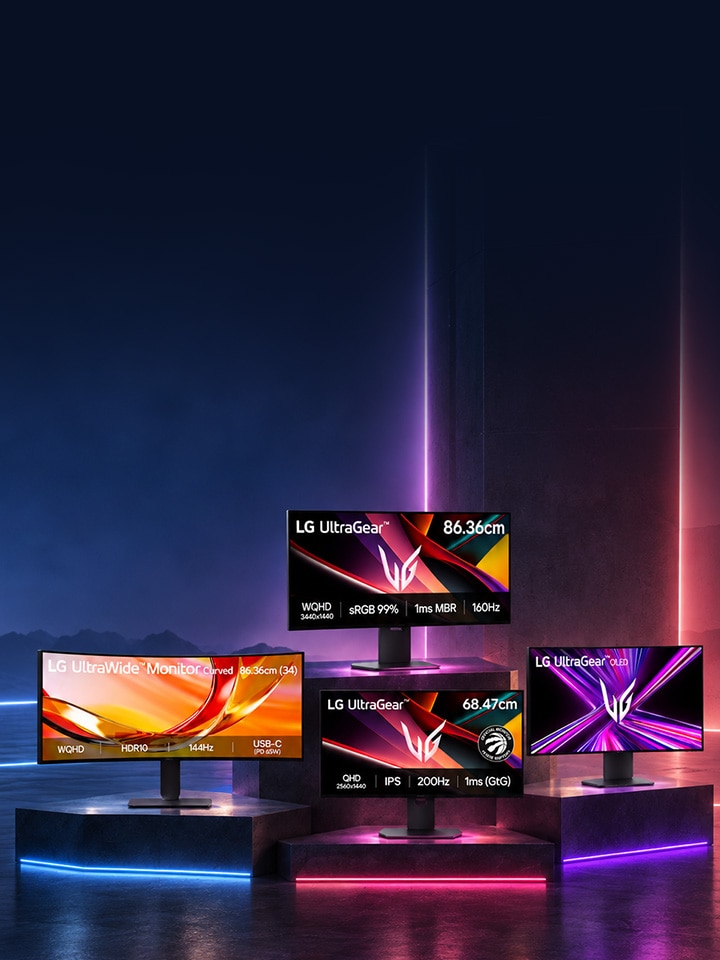
Top 4 LG Monitors for Gaming
1. LG UltraGear 39GX900A -B — 99.09 cm (39) OLED Curved Monitor
View 39GX900A-B on LG.com
This is LG's flagship gaming display, and it sits at the top of the price range for a reason. The 99.09 cm (39) 21:9 WQHD (3440x1440) OLED panel wraps around you with an 800R curve, running at 240Hz with a 0.03ms (GtG) response time, backed by DisplayHDR True Black 400, a 1.5M:1 contrast ratio, and 98.5% DCI-P3 coverage for genuinely deep blacks and true-to-life color. It is VESA AdaptiveSync certified, NVIDIA G-Sync Compatible, and carries AMD FreeSync Premium Pro, so tearing is a non-issue at high frame rates.
For multitasking, the LG Switch app splits the display into up to 11 layouts, and USB-C with 65W Power Delivery charges a connected laptop over a single cable, cutting out a separate power adapter. At this size and spec, it is built for gamers who want the single best screen in the room, not a budget pick.
2. LG UltraGear 27G610A-B — 68.47 cm (27) QHD IPS Monitor
View 27G610A-B on LG.com
A sharper, more accessible entry point into serious gaming. The 114.3 cm (45) QHD (2560x1440) IPS panel runs at 200Hz with 1ms (GtG) response time, VESA DisplayHDR 400, and 99% sRGB (Typ.) coverage for accurate color. AMD FreeSync Premium keeps motion tear-free, and the virtually borderless design with swivel, tilt, and height adjustment makes it easy to fit into a compact desk setup.
This is the one to consider if the goal is a genuinely good competitive monitor without stretching toward flagship pricing — sharp detail, fast enough for most fast-paced titles, and easy on desk space.
3. LG UltraGear 34G600A-B — 86.36 cm (34) WQHD Curved Monitor
View 34G600A-B on LG.com
For gamers who want screen real estate as much as speed, this 86.36 cm (34) 21:9 WQHD (3440x1440) curved VA panel offers a 34% wider view than a standard 16:9 screen, giving competitive and immersive gamers alike a wider field of view to spot enemies sooner in shooters and take in more of the action in racing and open-world titles. It runs at 160Hz with 1ms Motion Blur Reduction, HDR10, 99% sRGB coverage, and both AMD FreeSync Premium and NVIDIA G-Sync Compatible support. Built-in 5W x2 speakers with MaxxAudio round out the package without needing external audio.
It sits in the middle of this lineup on price — a genuine step up from a standard 16:9 monitor in immersion, without reaching flagship OLED cost.
4. LG UltraWide 34U640B-B (2026) — 86.36 cm (34) WQHD Curved Monitor
View 34U640B-B on LG.com
The most multitasking-focused monitor on this list. The same 21:9 WQHD (3440x1440) curved 1800R display runs at 144Hz with HDR10 and 99% sRGB, but the real story here is connectivity and workflow: USB Type-C with 65W Power Delivery charges a laptop over a single cable, and Dual Controller (KVM Switch) lets one keyboard, mouse, and screen control two separate PCs at once. The LG Switch app splits the display into up to 6 sections, with PBP and PIP support for running multiple sources side by side.
This is the pick for anyone who games in the evening and works or streams during the day on the same desk — it is priced closer to the curved WQHD tier, not the OLED flagship tier, while adding productivity tools the other three do not have.
Side-by-Side Comparison
| Model |
Size |
Resolution |
Refresh Rate |
Best For |
| 39GX900A-B |
99.09 cm (39) |
3440x1440 OLED |
240Hz |
Flagship immersion & speed |
| 27G610A-B |
68.47 cm (27) |
2560x1440 IPS |
200Hz |
Accessible competitive gaming |
| 34G600A-B |
86.36 cm (34) |
3440x1440 VA |
160Hz |
Wide-screen immersion |
| 34U640B-B |
86.36 cm (34) |
3440x1440 IPS |
144Hz |
Gaming + multitasking/work |