We use cookies, including cookies from third parties, to enhance your user experience and the effectiveness of our marketing activities. These cookies are performance, analytics and advertising cookies, please see our Privacy and Cookie policy for further information. If you agree to all of our cookies select “Accept all” or select “Cookie Settings” to see which cookies we use and choose which ones you would like to accept.
LG TV Signage with Essential Function
LG 86UR640S Essential Function
*All images in this web page are for illustrative purposes only.
*LG Conventional' refers to LG UT640S series.
*SoC : System On Chip.
**GUI : Graphical User Interface.
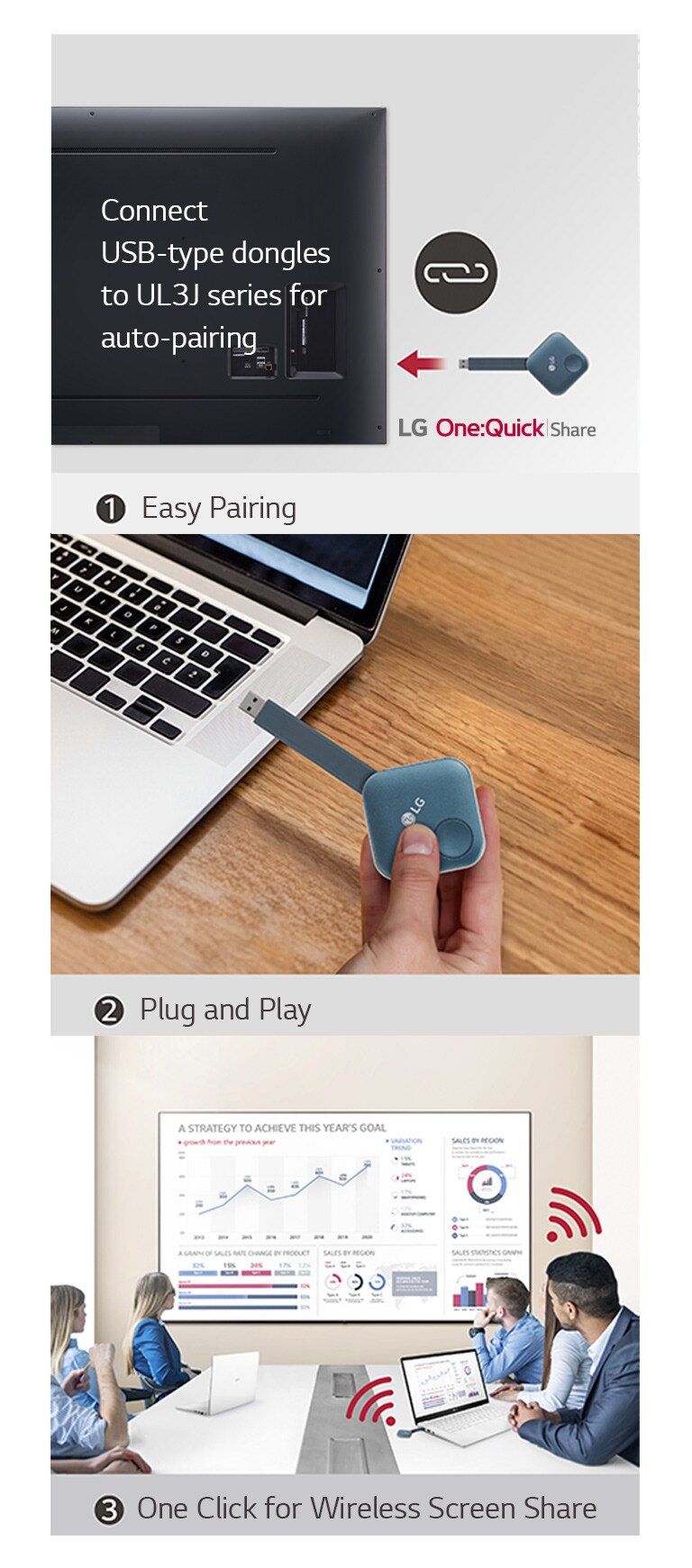
LG’s Wireless Screen Sharing Solution, LG One:Quick Share
This consist of images displaying the 3-step instructions on installing LG One:Quick Share USB Dongle and sharing the personal screen. The first image pairs the USB Dongle and the LG signage. The second image describes a person holding the USB dongle, attempting to connect it to the PC. The last image consists of people having a meeting by connecting an USB dongle device to a laptop, then sharing the screen through the UL3J on the wall.
*Users need to set up Soft AP enabled at Network Menu of the Signage.
**Users can enable Office Meeting Mode at EZ Setting Menu of the Signage.
***LG One:Quick Share needs to be purchased separately.
Versatile Content Management with LG SuperSign CMS
LG 86UR640S SuperSign CMS
*LG SuperSign CMS is sold separately.
*LG SuperSign Control needs to be purchased separately.
*Initial setting from display is required for Crestron Connected® compatibility.
**Network based control.
Real-Time Promotion & Content Sharing
With Beacon and Bluetooth® Low Energy (BLE), shop managers can provide coupons and information in real-time. And content mirroring is supported from android mobiles and Windows laptop over Miracast.
LG 86UR640S Content Sharing
*Pre-set Support Vertical : Corporate / Government / Retail, Meeting room
Real-Time LG ConnectedCare Service
LG 86UR640S ConnectedCare Service
*The availability of the 'LG ConnectedCare' service differs by region, and it needs to be purchased separately. So please contact the LG sales representative in your region for more details.
All Spec
INFO
Category
Smart TV Signage
SUPERSIGN SW COMPATIBILITY
CMS(Premium)
YES
Control / Control Plus
YES
LG Connected Care
YES
Simple Editor
YES
VERTICAL FUNCTION (HOSPITAL)
Healthcare Headphone Mode
-
Pillow Speaker
-
Protection Cover (Glass)
-
ACCESSORIES
Power Cable
YES (1.5 M, Straight Type)
Remote type
S-con
BROADCASTING SYSTEM
Analog (NTSC / SECAM / PAL)
PAL
Digital
DVB-T2/C
Teletext (Auto Teletext)
YES
POWER SPEC.
Power Consumption(Max)
198 W
Power Consumption(Typ)
169 W
Power Supply (Voltage, Hz)
AC 100~240 V 50/60 Hz
Standby Power Consumption
Under 0.5 W
STANDARD
Others
-
EMC
CE
Safety
CB, CU TR
STANDARD (EU_NEW LABEL(`21.3~))
HDR Grade
-
HDR On mode
-
SDR Grade
-
SDR On mode
-
AUDIO (SOUND)
AI Acoustic Tuning
-
AI Sound
-
LG Sound Sync
YES
Speaker (Audio Output)
20 W
DISPLAY
Brightness (Typ.)
400 nit
Resolution
4K Ultra HD (3,840 x 2,160)
Size (Inch)
164 CM (65)
MECHANICAL
Credenza/Security Screw Hole
-
Kensington Lock
YES
Lock Down Plate (for easy installing)
-
VESA Compatible
300 x 300 mm
STANDARD (EU_OLD LABEL(~`21.3))
Average Annual Consumption(kWh)
-
ErP Class
-
Luminance Ratio (%)
-
On Power Consumption
-
VIDEO
Game Optimizer
-
AI Picture Pro
-
HDR_HDR 10 Pro
YES
HDR_HLG (Hybrid Log Gamma)
YES
SMART FUNCTION
AOD
-
Bluetooth
YES
Bluetooth Audio Playback
YES
DIAL
YES
Gallery Mode
-
HDMI-ARC
YES (HDMI 2)
Home Office
-
IoT
-
Magic Remote Compatibility
-
Mood Display
YES
Multi-View
-
Screen Share
YES
Soft AP
YES
Voice Recognition (Standalone/Solution)
-
webOS version
webOS 6.0
Web Browser
YES
Wi-Fi
YES
DIMENSIONS/WEIGHT
Bezel Width (L/R/U/B, Off Bezel)
6.8/6.8/6.8/18.4 mm
Bezel Width (L/R/U/B, On Bezel)
12.8/12.8/12.8/19.9 mm
Dimension in Shipping (W x H x D)
1600 x 970 x 172 mm
Dimension without Stand (W x H x D)
1454 x 838 x 57.7 mm
Dimension with Stand (W x H x D)
1454 x 899 x 271 mm
Weight in Shipping
27.8 kg
Weight without Stand
21.5 kg
Weight with Stand
21.8 kg
CONNECTIVITIES
External Speaker Out(3.5mm Phone jack)
YES
Audio Line Out(3.5mm Phone jack)
-
AV In
YES
CI Slot
-
Component in (Y,Pb,Pr-Video)
-
DC Adapter In
-
Digital Audio Out (Optical)
YES
ECI (RJ12 jack)
-
Expansion slot (60pin)
-
EXT. IR In
-
HDMI In
YES (3 ea)
Headphone Out
YES
LG SVC only (Phone jack type)
YES
MPI Port (RJ12 jack)
-
PC Audio Input
-
Pillow Speaker interface (6pin)
-
PoC (Power over Coax)
-
RF In
YES (1 ea)
RGB In (D-sub 15pin) - PC
-
RJ45 (Usage Purpose)
YES (LAN)
RS-232C (D-Sub 9pin / Phone jack)
YES (Phone jack)
TV link Configuration (Phone jack type)
-
USB (Ver.)
YES (1 ea / 2.0)
HOSPITALITY SOLUTION
Other DRM
-
Pro:Centric Cloud
-
Pro:Centric Direct
-
Pro:Centric Server
-
Pro:Centric Smart
-
Pro:Centric V
-
Pro:Idiom (DRM)
-
Pro:Idiom Media (DRM)
-
Quick Menu (Customizable Portal)
-
webRTC (Real Time Communication)
-
VERTICAL FUNCTION (CORPORATE/RETAIL)
BEACON
YES
CISCO Certi. Compatibility
YES
Crestron Certi. Compatibility
YES
DPM (Digital Power Management)
YES
Embedded CM (Contents Manager)
YES
Embedded GM (Group Manager)
YES
Fail Over
YES
NTP Server Setting
YES
NTP sync timer
YES
Play Via URL
YES
Promota / Mobile CMS
YES
RTC (Real Time Clock)
YES
Time scheduler
YES
Vertical Setup
YES
Video Tag
-
HOSPITALITY FEATURE
One Channel Map
YES
b-LAN
-
Conformal Coating
-
Diagnostics
YES (Self Diagnostics(USB))
Energy Saving mode
YES
Enterprise Mode
-
External Power Out
-
External Speaker Out / Line Out
YES (Ext. Speaker Out)
EzManager
-
Full Touch Screen
-
Hotel Mode / PDM / Installer Menu
YES
HTNG-CEC (Version)
YES
Insert Image
YES
Instant ON
-
IR Out
YES (RS-232C, HDMI)
Lock mode
YES (Limited)
Mobile Remote
-
Multi IR Code
YES
Port Block
YES
RJP (Remote Jack Pack) Compatibility
YES
Simplink(HDMI-CEC) (Version)
YES (1.4)
SNMP
YES
USB Auto playback / playback+
-
USB Cloning
YES
V-Lan Tag
-
Wake on RF
-
Welcome Screen (Splash Image)
YES
Welcome Video
-
WOL
YES
DESIGN
Front Color
Ashed Blue
Stand Type
2 Pole
Tool Name
UP8000
Leaflet
To access more technical documentation and resources, please visit the LG B2B Partner Portal.