We use cookies, including cookies from third parties, to enhance your user experience and the effectiveness of our marketing activities. These cookies are performance, analytics and advertising cookies, please see our Privacy and Cookie policy for further information. If you agree to all of our cookies select “Accept all” or select “Cookie Settings” to see which cookies we use and choose which ones you would like to accept.

Helpful Hints
How to Stop Your Cordless Vacuum From Smelling Bad
Find out how bad smells can form inside your cordless vacuum and how regular maintenance can help stop them from taking hold.
Have you discovered an unpleasant smell coming from your cordless vacuum cleaner? In our informative guide, we will explore the common sources of vacuum smells and provide practical tips on how to prevent them from occurring. From proper cleaning techniques to daily maintenance steps, we've got you covered, along with recommending some LG products that are perfect for your home’s needs. Learn how to tackle those foul odours and enjoy a revitalised cleaning routine.
Where does the vacuum cleaner smell come from?
The unpleasant odour in your cordless vacuum cleaner typically arises from the accumulation of moisture, dirt, dust, bacteria, and other particles picked up during cleaning. If not cleaned and maintained, these materials can create conditions that promote bacterial and mould growth, leading to persistent odours overtime. To ensure a clean and fresh vacuuming experience, regular vacuum maintenance is essential. By adopting simple cleaning practices, you can help prevent unpleasant smells and enjoy a more effective and enjoyable cleaning routine.
Step 1
Read the instruction manual
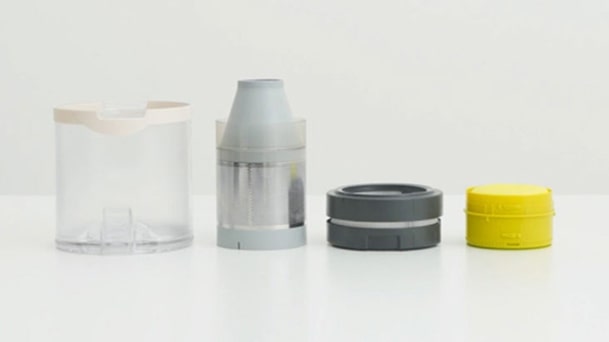
With many different vacuum cleaners available, it's important to take a moment to read the product manual before cleaning. This will help you understand the specific features and limitations of your vacuum cleaner, including whether it can be washed with water. Disassemble the vacuum according to the instruction manual and clean the nozzles, dust bin, filters, and cyclone system components. By following these simple steps, you can help keep the vacuum cleaner in good condition and maintain its performance over time.
Step 2
Remove foreign matter
Large debris or objects can easily clog the pipe or air intake of your stick vacuum cleaner, affecting the vacuum's performance, increasing power consumption, and leading to poor ventilation and unpleasant odours. To address this, start by disassembling the vacuum cleaner and removing any foreign objects lodged inside. Thoroughly clean the pipe and air intake areas of your vacuum. These simple steps will help keep your vacuum cleaner running smoothly, maintain its performance, and minimise any lingering smells.
Step 3
Clean the dust bin or bag regularly
The dust box or bag in your vacuum cleaner collects various types of dirt like dust and hair. If left uncleared, along with unintentional moisture intake, it can become a source of unpleasant odours. To tackle this, it's advisable to empty the dirt from the box or bag right after use. Follow the instructions to wash or wipe away any stubborn dirt, ensuring it is completely dry before placing it back in the vacuum cleaner. By promptly addressing the dirt and keeping the dust box or bag clean and dry, you can help minimise any unwanted smells from lingering around.
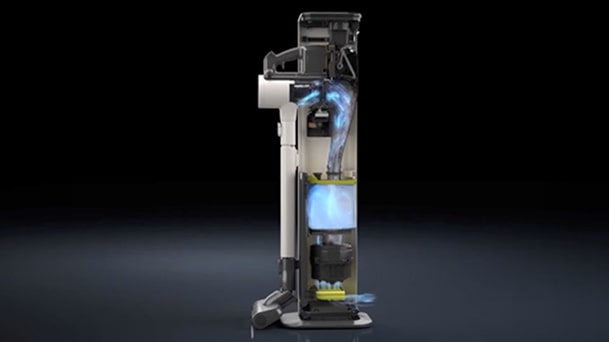
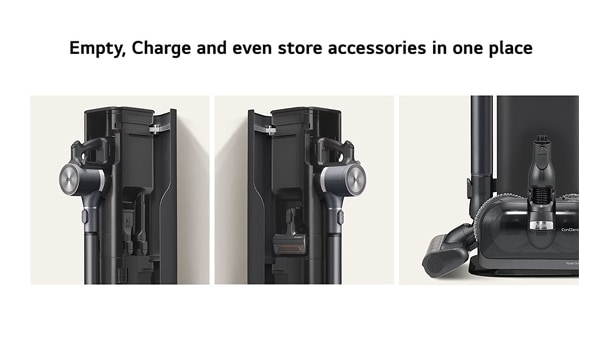
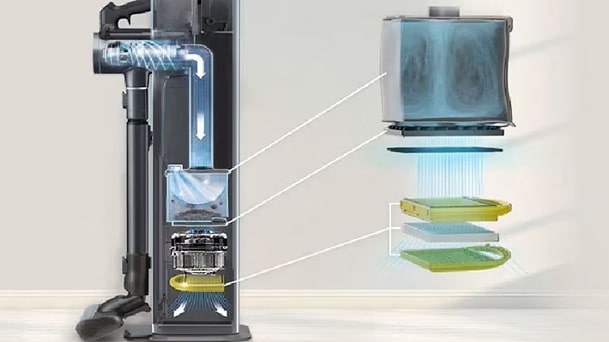
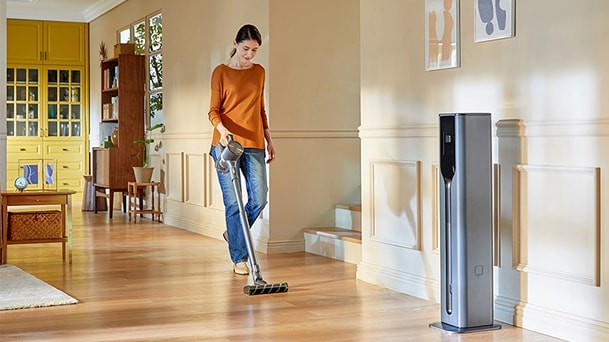
Choose a cordless vacuum with an auto-emptying function or accessory to help tacking this differently. LG CordZero®Auto Emptying All-in-One Tower accessories are designed to improve this part of the cleaning process. Compatible LG vacuums can be automatically empty the collected dust into this tower, which also serves as a dock to recharge your vacuum and a space to store vacuum accessories. Instead of emptying your vacuum’s dust bin after each use, users can replace the larger dust storage bag within the tower when it becomes full! Replacement of dustbag frequency may vary depending on usage and the operating environment. The tower features a 3-step filtration system designed to help contain collected dirt and dust while passing air through filters that help capture fine dust particles.
Step 4
Clean and replace filters regularly
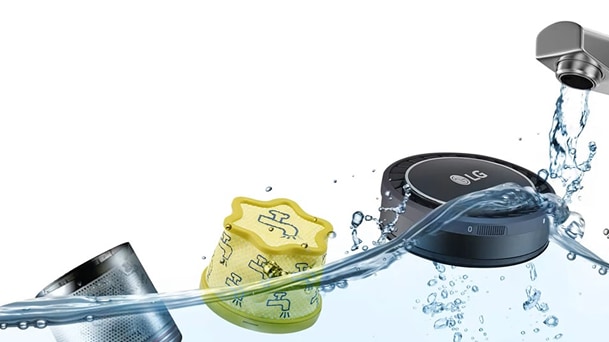
When a vacuum cleaner filter becomes clogged, suction performance may be reduced and unpleasant odours can develop over time. Cleaning the filter can sometimes be challenging, so a washable filter can make maintenance easier and more convenient. By allowing the filter to be cleaned regularly, a washable filter can help reduce blockages, minimise odour build-up, and support ongoing vacuum performance.
After washing, ensure the filter is completely dry before reinserting it, as moisture left in the filter can cause odours
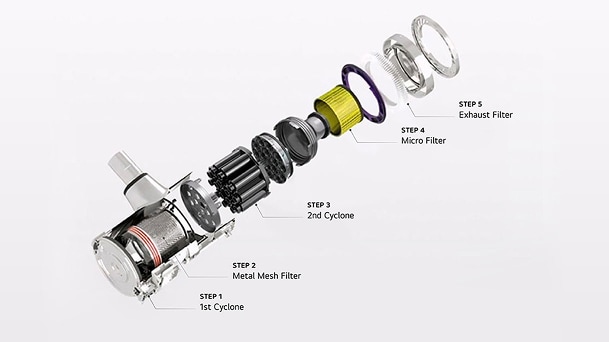
Many LG vacuums include a multi‑stage filtration system designed to capture dust and debris within the unit. The system separates larger and smaller particles layer by layer before air passes through additional filters. The metal filter, cloth pre‑filter and fine dust filters can be removed and washed to help maintain performance. Filters should be hand‑washed in clean water and fully air‑dried before being placed back into the vacuum.
Step 5
Maintain the vacuum’s suction head
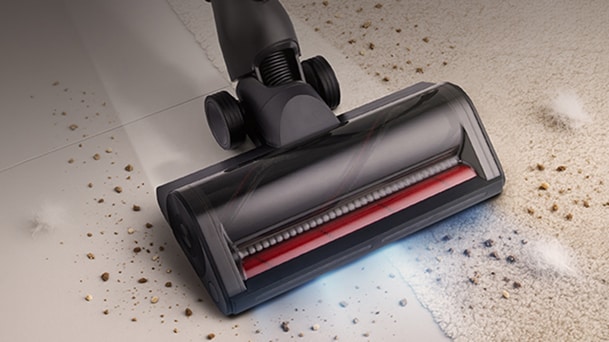
Lastly, remember to take care of the suction head of your vacuum cleaner. Listen for strange noises coming from the head, as this can be a sign of lodged debris, and check to see if the suction head is stuck or unable to rotate properly. Once you identify any foreign objects, simply remove them. Refer to the instructions provided for the specific suction head and clean it accordingly. With that, you've successfully completed the cleaning process for your vacuum cleaner!
Daily vacuum maintenance
To help prevent your stick vacuum cleaner from developing unpleasant odours, incorporate these daily maintenance tasks. Firstly, empty the dust bin after each use or replace the dust bag regularly, depending on the usage environment, to prevent overfilling the dust collection area and reduce lingering smells. Clean the filter regularly, as a clogged or dirty filter can contribute to odours. Pay attention to any brushes or attachments and remove any entangled hair or fibers. Lastly, wipe down the vacuum’s exterior surfaces to remove any dust or grime. Incorporating these daily maintenance tasks into your cleaning routine can keep your vacuum cleaner fresh, efficient, and free from unpleasant smells.
Choose the right vacuum for the task
Regular cleaning and maintenance can help keep your vacuum fresh, and choosing a model with convenient design features can make this easier. LG CordZero vacuum cleaners include features designed to support simple upkeep and help manage odour development during everyday use.
Choose a vacuum with a washable filter
Cleaning the filter on your vacuum can help maintain suction power and cleaning performance. A clogged or dirty filter restricts airflow, reducing the vacuum's effectiveness in capturing dirt and debris. Regular filter cleaning can help support the efficient operation, help extend the life of the vacuum, and contribute to a clean and healthy environment. Well-designed vacuums allow for the easy removal and thorough cleaning of vacuum parts. In LG’s CordZero series, the cyclone system, metal filter, cloth pre-filter, and fine dust filters can be easily removed and washed to clean away dirt. Filters should be hand-washed in clean water and left to completely air-dry before being placed back into the machine.
Additionally, selected LG CordZero models can be connected to your iOS or Android smartphone via the LG ThinQTM App. After connecting to your home wireless network, you can monitor the weekly, monthly, and annual usage of your vacuum from within the app, helping you monitor filter maintenance needs over time. The ThinQTM App helps you track the current battery charge of your device, as well as the ability to run diagnostics and check your cleaning history. Important maintenance information is always on hand in one smart and functional application.1
* Compatible smartphone required with Android 7.0 or later or iOS 14.0 or later required for LG ThinQ™ app. Mobile and Home Wi-Fi Data connection required.
Choose LG’s self-emptying system
LG developed the LG CordZero® Auto Emptying All-in-One Tower accessory to improve the vacuum-emptying aspect of cleaning. When connected, compatible LG vacuums are automatically emptied into the tower's larger dust container, reducing the need for manual emptying of the LG CordZero stick vacuum cleaner's dust bin.
The tower incorporates a 3-step filtration system, securely trapping dirt and filtering out particles to help minimise the release of dust or pet hair into the air during emptying. With convenient storage space for vacuum accessories, you can enjoy a more organised cleaning routine, and the dust bag in the tower only requires replacing once full. Experience a streamlined cleaning process with LG's innovative All-in-One Tower accessory.
Choose a vacuum with a removable suction head
Many everyday occurrences can contribute to a build-up of smell and bacteria within your vacuum cleaner, such as pet urine or spills of pungent ingredients in the kitchen. To help minimise lingering odours, it is important to clean key parts, both inside and out. LG CordZero A9 vacuums come with an easily removable suction head, making it easier to get to the source of the problem quickly. Simply separate the head, clean and sanitise it, and help reduce any smell at the source.
Conclusion
If you are looking to reduce unpleasant odours from your vacuum cleaner, consider choosing an LG CordZero vacuum cleaner. With a washable filter system and removable cyclone system, it is deisgned for efficient cleaning andhelp minimise odour build-up. Featuring a stylish design, extended battery life, and powerful suction, this vacuum comes with a range of suction heads to meet your different cleaning needs. Say goodbye to unpleasant odours and hello to the ultimate home cleaning companion with the LG CordZero vacuum cleaners.
Find the Right Vacuum Cleaner for Your Home
The right vacuum cleaner can make everyday maintenance simpler and help keep your cleaning routine feeling enjoyable. Explore LG vacuum cleaners below and discover features designed to fit your home and lifestyle.
FAQs
Q.
Why does my cordless vacuum smell bad?
A.
Bad smells can build up when moisture, dirt, bacteria, and other particles remain inside the vacuum after cleaning. Regular maintenance can help prevent odour-causing buildup and maintains your vacuum's performance.
Q.
How often should I empty my vacuum cleaner’s dust bin?
A.
It is recommended to empty the dust bin after each use to help prevent dirt, hair, and moisture from creating unpleasant odours. Make sure the dust bin is completely dry before placing it back into the vacuum.
Q.
Can cleaning the filter help reduce vacuum cleaner odours?
A.
Yes. A clogged or dirty filter can reduce airflow and contribute to bad smells, so regular filter cleaning is important. Washable filters should be hand-washed in clean water and fully air-dried before reuse.
Q.
What parts of a cordless vacuum cleaner should I clean regularly?
A.
Clean the dust bin, filters, pipe, air intake, nozzles, cyclone system, and suction head according to the product manual. Removing trapped debris and hair helps maintain suction power and reduce lingering smells.
Q.
How can LG CordZero help with vacuum maintenance?
A.
LG CordZero A9 models include washable filters and removable parts designed for easy cleaning. Compatible models can also work with the LG CordZero® Auto Emptying All-in-One Tower, which automatically empties the dust bin into a larger dust container and helps contain dustc and dirt.
* The product images in the image and video are for illustrative purposes only and might differ from the real product.