We use cookies, including cookies from third parties, to enhance your user experience and the effectiveness of our marketing activities. These cookies are performance, analytics and advertising cookies, please see our Privacy and Cookie policy for further information. If you agree to all of our cookies select “Accept all” or select “Cookie Settings” to see which cookies we use and choose which ones you would like to accept.

Why do refresh rate and response time matter in gaming?
For shooters or racing games, choose a monitor with a high refresh rate and fast response time. These factors keep motion clear and reduces ghosting, helping you not to miss any action during fast moving sequences.
What is refresh rate of a gaming monitor?
A gaming monitor's refresh rate, measured in Hertz (Hz), represents the number of times the screen updates its image every second. In fast-paced gaming, a higher refresh rate is crucial because it promotes smoother motion and helps reduce distracting motion blur. By rendering transitions more densely, it enhances your responsiveness for fast tracking and precise aiming during intense action. Building on this high-refresh-rate performance, LG UltraGear™ pushes refresh rates even further with a native FHD 1000Hz gaming monitor (25G590B).
*The images above are simulated for illustrative purposes only.
*Images have been simulated to enhance feature understanding of the LG UltraGear 25G590B, the world's first native 1000Hz gaming monitor. Actual use experience may differ.
Why are refresh rate and response time important for fast-paced gameplay?
To push the boundaries of speed, UltraGear models deliver an industry-leading refresh rate of up to 1000Hz and an ultra-fast response time as fast as 0.03ms (GtG). This powerful combination drastically reduces motion blur and eliminates ghosting for smooth and precise visual motion. This responsiveness helps you stay focused and in control, whether you are climbing competitive ranks or tracking high-speed targets.
*The 1000Hz refresh rate (native) applies only to LG UltraGear 25G590B.
*The 0.03ms (GtG) response time specification applies to LG UltraGear OLED models.
What is Dual-Mode on a gaming monitor?
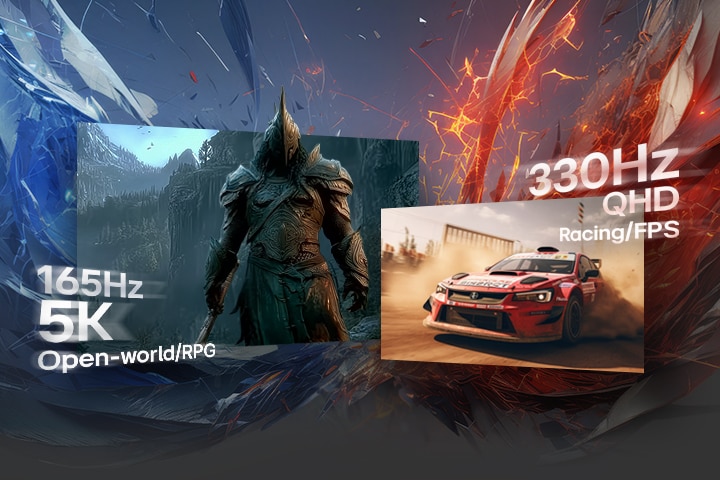
Dual-Mode lets a gaming monitor switch between two display settings, allowing you to prioritize either higher resolution or a faster refresh rate depending on the game. UltraGear brings this flexibility to select models; for instance, 27GM950B supports 165Hz at 5K resolution for graphically rich games and 330Hz at QHD resolution for fast-paced gaming. You can change modes instantly through the physical Hot Key or menu, with no cable swaps or reboots. It’s like having two monitors in one, ready for whatever game you’re playing.
*This feature is based on the specifications of the model 27GM950B.
What is Adaptive Sync on a gaming monitor?
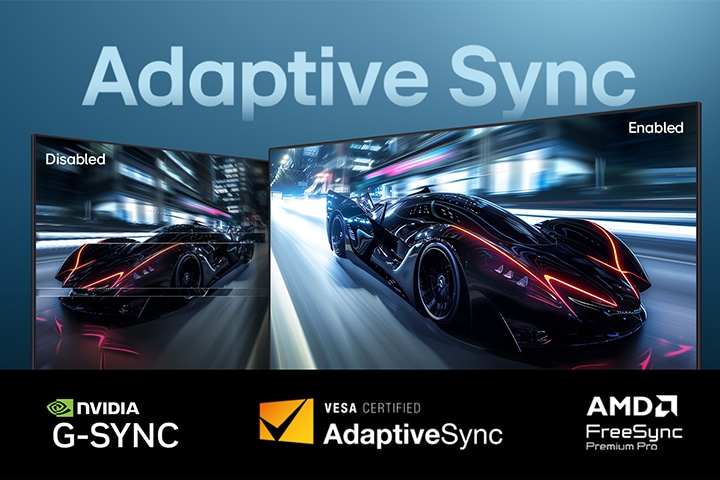
Adaptive Sync (Adaptive-Sync) is a technology that synchronizes a monitor's refresh rate with the graphics card's frame rate to eliminate screen tearing and stuttering. To keep that motion fluid and uninterrupted, UltraGear also supports the industry’s premier certifications—including NVIDIA® G-SYNC® compatible, AMD FreeSync™ Premium Pro (or AMD FreeSync™ Premium), and VESA AdaptiveSync™. These advanced standards help deliver fluid, uninterrupted, and reduced tearing gameplay, even during intense fights or rapid camera pans. Whether you're climbing ranks or exploring maps, you stay focused and in control.
Why does the latest DP 2.1 matter for gaming performance?
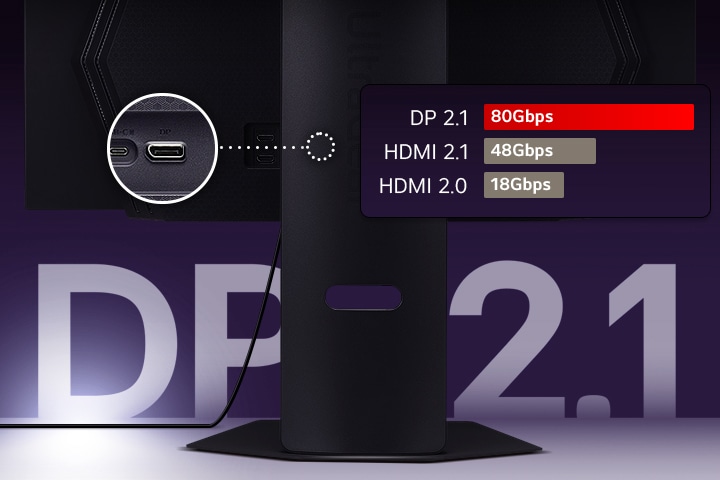
For smooth visuals and full performance, UltraGear monitors feature the latest DisplayPort 2.1 technology, delivering significantly higher bandwidth than HDMI for higher uncompressed resolutions and ultra-fast refresh rate—ideal for high-end GPUs and PC gaming. DisplayPort 2.1 supports up to 80Gbps of bandwidth—more than double that of HDMI 2.1 (up to 48Gbps)—and far beyond HDMI 2.0 (18Gbps). This allows for higher frame rates at 4K and beyond, with lower latency and better stability in demanding titles. HDMI 2.0 supports 4K at 60Hz, while HDMI 2.1 enables 4K at 120Hz for next-gen consoles.
Recommended gaming monitors for fast, responsive gameplay
Frequently Asked Questions
Q.
Which UltraGear gaming monitors offer the highest refresh rates?
A.
The UltraGear™ gaming monitors that offer the highest refresh rates are designed to keep motion smooth and responsive during gameplay. Refresh rate is especially important because it affects how fluid on-screen movement looks and how clearly you can track fast action. Higher refresh rates can improve motion clarity, help reduce motion blur, and minimize ghosting in fast-paced competitive games. For professional esports players and serious competitive FPS gamers, the LG UltraGear™ 25G590B offers the world’s first* NATIVE 1000Hz refresh rate (1100Hz (O/C)). If you are looking for Dual-Mode flexibility, models like 27GM950B and 39GX950B support a native 165Hz refresh rate that can switch to 330Hz at lower resolutions for incredibly smooth action.
*Based on publicly available information as of May 19, 2026, among gaming monitors introduced by consumer brands.
Q.
Which gaming monitors allow easy switching between refresh rates?
A.
Gaming monitors that allow easy switching between refresh rates are ideal for players who move between different genres and performance needs. This capability lets you prioritize higher resolution and visual quality for rich cinematic titles, or quickly shift to higher refresh rates for competitive FPS gameplay where fluid motion is more important. LG UltraGear™ gaming monitors featuring Dual‑Mode make these changes straightforward, allowing you to adjust settings using a physical Hot Key or on‑screen menu without changing cables, so you can seamlessly adapt the monitor to your preferred gameplay style.
Q.
What are the best curved 240Hz gaming monitors?
A.
For curved 240Hz gaming, the LG UltraGear™ 52G930B is a strong option. This model features a large 52‑inch screen with a 1000R curvature that brings more of the display into your natural field of view, helping open‑world and RPG games feel more engaging. By combining this wraparound design with a fluid 240Hz refresh rate and an ultra‑fast 1ms (GtG) response time, it supports a deeper sense of in‑game presence and very sharp motion clarity.
Q.
How do Dual-Mode refresh rate gaming monitors compare to single refresh rate models?
A.
Dual‑Mode refresh rate gaming monitors offer more flexibility than single refresh rate models because they let users switch between different resolution and refresh rate combinations based on the games they play. Competitive gamers may choose higher refresh rates for smoother motion and faster responsiveness in FPS titles, while higher‑resolution modes can provide sharper detail and more immersive visuals in RPG, open‑world, and cinematic games. The LG UltraGear™ 27GM950B and LG UltraGear™ 39GX950B both support Dual‑Mode, allowing players to move between high‑resolution gaming and ultra‑high refresh rate gameplay according to their preferred style and performance priorities.